Per the June 2021 Power BI it appears that formatting of measures should flow through to local models when using direct query against a Power BI data set. Unfortunately, I am not seeing this behavior in my local model that has a direct query against one Power BI data set. I see the option is in "preview", but don't see anywhere in the options that I need to "check a box" other than for the overall option to activate direct query against power bi data sets.

After the June update new folders did appear with the measure format strings:
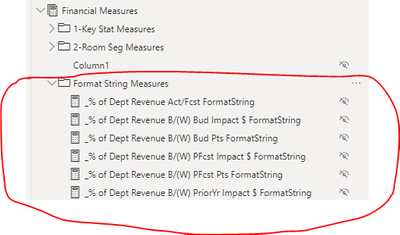
However, if I go and view the actual measure formatting or use the measure in the report there is no formatting. Below is a measure that is formatted as % with one decimal in the dataset, but in the local model that direct queries against that data set there is no formatting per the screenshot below:
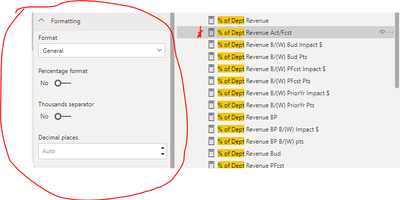
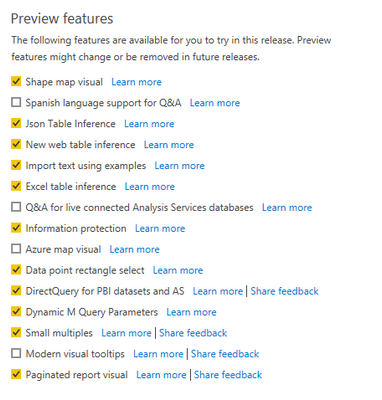
Not sure if I am misunderstanding what the June update addressed, if have not activated this preview feature correctly or if there is a bug. Any help/guidance would be appreciated. Here are my preview options:
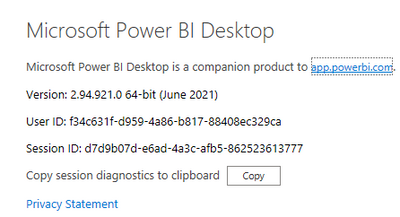
Here is the version I have installed:
Thank you in advance!
Luke

 on:
Dataflow error communicating with another service
on:
Dataflow error communicating with another service
 yanlinnnaing
on:
Issue: Oracle Cloud Connection created without cen...
yanlinnnaing
on:
Issue: Oracle Cloud Connection created without cen...
 on:
Option to set key column is missing in June 2026 r...
on:
Option to set key column is missing in June 2026 r...