Join us in Barcelona for FabCon and SQLCon, September 28 - October 1, 2026.
This is best Fabric, Power BI, SQL and AI community event. How do we know? The last event sold out! Save €200 with code FABCMTY200.
Register now- Power BI forums
- Get Help with Power BI
- Desktop
- Service
- Report Server
- Power Query
- Mobile Apps
- Developer
- DAX Commands and Tips
- Custom Visuals Development Discussion
- Health and Life Sciences
- Power BI Spanish forums
- Translated Spanish Desktop
- Training and Consulting
- Instructor Led Training
- Dashboard in a Day for Women, by Women
- Galleries
- Data Stories Gallery
- Themes Gallery
- Contests Gallery
- QuickViz Gallery
- Quick Measures Gallery
- Visual Calculations Gallery
- Notebook Gallery
- Translytical Task Flow Gallery
- TMDL Gallery
- R Script Showcase
- Webinars and Video Gallery
- Ideas
- Custom Visuals Ideas (read-only)
- Issues
- Issues
- Events
- Upcoming Events
A new Data Days event is coming soon! This time we’re going bigger than ever. Fabric, Power BI, SQL, AI and more. Don't miss out.
- Power BI forums
- Issues
- Issues
Share your ideas and vote for future features
- Mark all as New
- Mark all as Read
- Float this item to the top
- Subscribe
- Bookmark
- Subscribe to RSS Feed


 on
02-23-2017
04:50 AM
on
02-23-2017
04:50 AM
Hi,
According to my research, a similar issue has been reported internally, you can take a look at if this issue is related to your issue:
Issue description:
RLS role members fail to view report from premium workspace but can view exact same report from both desktop and shared workspace
ICM: 279241513
Thank you very much!
Best Regards,
Community Support Team _Robert Qin

Hi @bertlefever
May I know whether you are using the following connector? Is your problem that you don't see the dataflow used by the report dataset in Lineage? Is your workspace in a Premium capacity?
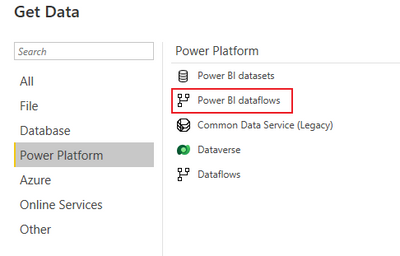
May I know whether you have enable dataflow load for the capacity resided the workspace? If you enable it in capacity setting, will you see the dataflow in your Lineage?
Best Regards,
Community Support Team _Caiyun
 on
04-11-2024
07:33 AM
on
04-11-2024
07:33 AM

Did this issue happen in Edge broswer? Currently there is a simliar issue which has been confirmed and fixed internal(ICM: 275713921😞
Fix was released with the .53 build of 96 stable, you can try to use the specifc version to check it.
Best Regards,
Community Support Team _ Yingjie Li
Hi,
Unfortunately, I can’t reproduce the same issue as yours.
I can normally open the report with the same style when I entered the dashboard via the link in the subscription email
If you still have a problem, would you like to post a download link of the pbix file with this issue without the sensitive data if it’s possible and we can help you to check if it’s an existing issue in the Power BI?
I also suggest you to make sure you have updated to the latest version of the Power BI desktop.
Thank you very much!
Best Regards,
Community Support Team _Robert Qin


Hi @MartynaM
Based on your description, I think you need simplify your Measure, including simplify its calculation and the data amount. Meanwhile, you may use Performance Analyzer to help you identify how long your dax formula or data query will take. For more details, you can refer Use Performance Analyzer to examine report element performance in Power BI Desktop - Power BI | Micr...
Best Regards,
Community Support Team _ Caiyun

 on
04-09-2024
07:31 AM
on
04-09-2024
07:31 AM

 on
12-09-2021
07:50 AM
on
12-09-2021
07:50 AM
Hi,
If you have an idea to help to improve the PowerBI, you can go to the Power BI Idea to submit a new idea so that people with the same idea can vote for you. I will also vote for you.
Thank you very much!
Best Regards,
Community Support Team _Robert Qin
- New 8,389
- Needs Info 3,502
- Investigating 3,603
- Accepted 2,094
- Declined 38
- Delivered 3,986
Helpful resources
-
 KevinChant
on:
Issues with changing the workspace ID when version...
KevinChant
on:
Issues with changing the workspace ID when version...
- kdrinnonLex on: BUG: Fabric pipelines stored procedure activity do...
-
JoshT
 on:
app.powerbi.com down?
on:
app.powerbi.com down?
-
 DataZoe
on:
Set as landing page feature missing in Apr 2026 up...
DataZoe
on:
Set as landing page feature missing in Apr 2026 up...
-
RossEdwards
 on:
Template App "Microsoft 365 Usage Analytics" faili...
on:
Template App "Microsoft 365 Usage Analytics" faili...
- NicoData on: “Filters on all pages” disappear from filter pane ...
- Tortitude on: No able to access Microsoft UI String Search page
- dcullen on: Gateway 3000.314.5 - Microsoft.Mashup.Container.Ne...
-
mattlee
on:
Input Text Slicer Broken on PBI Services
-
mattlee
on:
Input Slicer Bug: Cursor jumps to position 0 and v...
-
Reports
10,437 -
Data Modeling
4,225 -
Dashboards
4,183 -
Report Server
2,146 -
Gateways
2,137 -
APIS and Embedding
1,995 -
Custom Visuals
1,826 -
Content Packs
534 -
Mobile
354 -
Need Help
13 -
General Comment
7 -
Show and Tell
3 -
Tips and Tricks
2 -
Power BI Desktop
1