Hi - I just experienced an issue that has previously not happened.
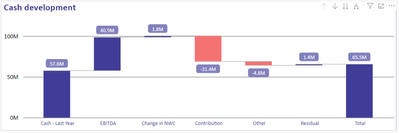
In my company, we have a waterfall chart showing cash development.
The graph uses switch variables to calculate the increases/decreases and then shows the resulting total sum.
This works well in the desktop setting and has previosly worked very well on the published report too.
However, I discovered today that the published report does not show the correct total value, but instead shows the final category of the waterfall.
This is extremely strange, as I have error-searched and cannot find any other explanaition than the fact that the web-browser report contains some kind of issue/bug.
Please see below:
Desktop graph
Power BI service graph
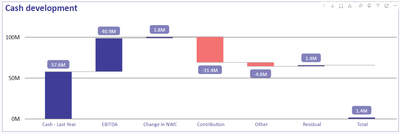
Both graphs in the picture are connected to the exact same dataset. I have also tried to replicate the graph in the dataset (Desktop) and it shows no issue. I have also tried new desktop reports connected to the dataset and no issue.
The only issue is when the report is published, it shows a different result.

 on:
Issue with new card visual - reference labels spac...
on:
Issue with new card visual - reference labels spac...
 mattlee
on:
Issue with new card visual after publishing to PBI...
mattlee
on:
Issue with new card visual after publishing to PBI...
 on:
Issue with Card Visual Layout After November Power...
on:
Issue with Card Visual Layout After November Power...