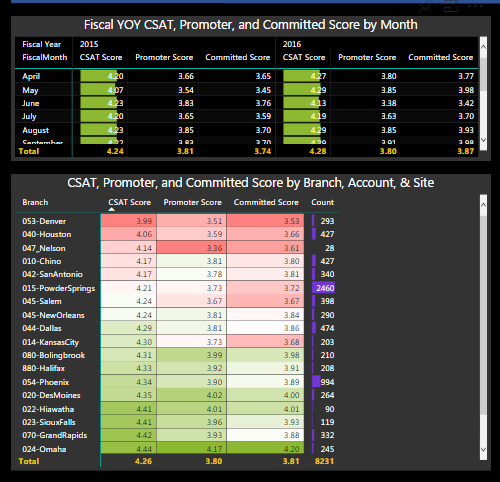
In the attached picture, these two tables have the same color gray visual background on a black page background. The former has the default background color (no color) for all of the headers and values. The latter has the rows, columns, and values formatted as the same color as the desired visual background.
With the first table, it would be nice to have the Header/Value default color resort to the desired background color, rather than "Seeing through" to the page background color.
Currently, to have desired Table Background color, Several formatting options must first be changed for each table. Especially very helpful is the desired visual background has any transparency value % (as the same transparency % is not offered in header/value formatting).


 on:
Dataflow error communicating with another service
on:
Dataflow error communicating with another service
 mattlee
on:
Tooltip sentence mode overrides help tooltip conte...
mattlee
on:
Tooltip sentence mode overrides help tooltip conte...
 on:
Option to set key column is missing in June 2026 r...
on:
Option to set key column is missing in June 2026 r...