FabCon is coming to Atlanta
Join us at FabCon Atlanta from March 16 - 20, 2026, for the ultimate Fabric, Power BI, AI and SQL community-led event. Save $200 with code FABCOMM.
Register now!- Power BI forums
- Get Help with Power BI
- Desktop
- Service
- Report Server
- Power Query
- Mobile Apps
- Developer
- DAX Commands and Tips
- Custom Visuals Development Discussion
- Health and Life Sciences
- Power BI Spanish forums
- Translated Spanish Desktop
- Training and Consulting
- Instructor Led Training
- Dashboard in a Day for Women, by Women
- Galleries
- Data Stories Gallery
- Themes Gallery
- Contests Gallery
- Quick Measures Gallery
- Notebook Gallery
- Translytical Task Flow Gallery
- TMDL Gallery
- R Script Showcase
- Webinars and Video Gallery
- Ideas
- Custom Visuals Ideas (read-only)
- Issues
- Issues
- Events
- Upcoming Events
To celebrate FabCon Vienna, we are offering 50% off select exams. Ends October 3rd. Request your discount now.
- Power BI forums
- Issues
- Issues
- PowerBI Settings -> Datamarts (Preview) -> Data so...
- Subscribe to RSS Feed
- Mark as New
- Mark as Read
- Bookmark
- Subscribe
- Printer Friendly Page
- Report Inappropriate Content

PowerBI Settings -> Datamarts (Preview) -> Data source credentials -> Edit credentials always fails
 siredman
on
03-29-2023
10:54 AM
siredman
on
03-29-2023
10:54 AM
It is not possible to edit credentials for (at least) AzureDataExplorer data sources. Any attempt to do so will give a popup like:
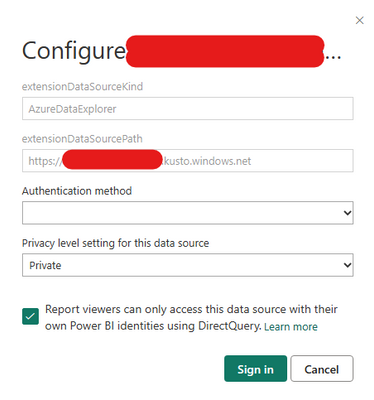
In which the Authentication method box is not populated. There are no options in the Authentication method dropdown.
Attempting to submit the dialogue will return a 400 error:
error: {code: "BadRequest", message: "Bad Request",…}
code: "BadRequest"
details: [{message: "The CredentialType field is required.", target: "request.CredentialType"}]
message: "Bad Request"
You must be a registered user to add a comment. If you've already registered, sign in. Otherwise, register and sign in.
- Pig1838 on: DirectQuery not available anymore in Incremental r...
- DataMindedLLC on: 'Refresh Preview' gone from Home Menu Bar in Aug 2...
- qutnd on: Issue with giving Power BI App access to new users
- Sree9100822653 on: undefinedHow to send daily RLS-based Power BI repo...
- Bart_Berg on: Export Data to Excel from powerbi embed reports | ...
- annelebel on: August 2025 Update Changed DirectQuery so each tab...
- manu_panizi on: Direct Query Mode Missing
- Jstukenborg on: Data on Power BI desktop is not refreshing
- noahfox on: Fabric 'Deploy Stage Content' API fails when user ...
- erpfau on: Fields Parameter w. hierarchies: provide option to...
- New 8,123
- Needs Info 3,502
- Investigating 3,602
- Accepted 2,088
- Declined 38
- Delivered 3,970
-
Reports
10,279 -
Data Modeling
4,161 -
Dashboards
4,125 -
Report Server
2,122 -
Gateways
2,122 -
APIS and Embedding
1,973 -
Custom Visuals
1,796 -
Content Packs
527 -
Mobile
355 -
Need Help
11 -
Show and Tell
3 -
General Comment
3 -
Tips and Tricks
1 -
Power BI Desktop
1