The expand / hide behaviour for the visualizations pane seems to be inverted.
This issue appears to be isolated to a specific file. Other files operate correctly, including when opened after / concurrently with the faulty file.
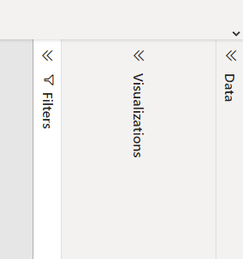
When opened, the pane presents as such:
When interacting with the opened pane, the pane shrinks as such:
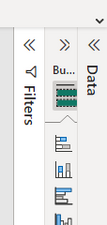
In this state, it can not be dragged out, visual icons are selectable and the pane can be returned to its prior state by clicking the 'hide' chevrons.
Is there a way to resolve this? In the current state, no visual can be edited without enabling the 'on-object formatting' preview feature which is not wanted.
PBI version: Version: 2.115.663.0 64-bit (March 2023)

 DataZoe
on:
Tooltip sentence mode overrides help tooltip conte...
DataZoe
on:
Tooltip sentence mode overrides help tooltip conte...
 on:
Option to set key column is missing in June 2026 r...
on:
Option to set key column is missing in June 2026 r...
 on:
Power BI Desktop Snowflake Refresh Fails: “Cannot ...
on:
Power BI Desktop Snowflake Refresh Fails: “Cannot ...
 KevinChant
on:
Issues with changing the workspace ID when version...
KevinChant
on:
Issues with changing the workspace ID when version...
Hi @GaryWalton ,
Glad the problem was solved, it's my pleasure!😊
Best regards,
Community Support Team_yanjiang