

-
 DataZoe
on:
Tooltip sentence mode overrides help tooltip conte...
DataZoe
on:
Tooltip sentence mode overrides help tooltip conte...
- abc54 on: Internal error: An unexpected error occurred (file...
- blake_entwisle1 on: Option to set key column is missing in June 2026 r...
-
mattlee
on:
Default format string locale for dates and numbers...
-
DatamirHub
 on:
Power BI Desktop Snowflake Refresh Fails: “Cannot ...
on:
Power BI Desktop Snowflake Refresh Fails: “Cannot ...
- NamelessLw on: Losing my mind in Fabric over SFTP & Azure Blob St...
-
 KevinChant
on:
Issues with changing the workspace ID when version...
KevinChant
on:
Issues with changing the workspace ID when version...
- beefbriskets0up on: May 2026 update - default format string locale for...
-
mattlee
on:
Default Locale and "None" Display Units should be ...
- kdrinnonLex on: BUG: Fabric pipelines stored procedure activity do...
Could not reproduce it in my side as far as my test.
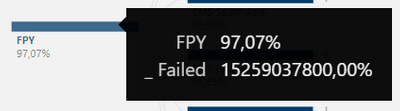
When I set Analyze and Tooltip fields with columns or measures, both of them work fine in the visual.
Whether consider providing more details about this issue like desktop version, sample test file which could reproduce it etc.
Best Regards,
Community Support Team _ Yingjie Li