Recently, I built a report to show [HH.MM] data label in Chart bar, found some bars data is incorrect with data source. For example, one of value is 7.23 from data source, however, it shows 7.299999996 in data label. I've checked backend and confirm the definition of the data column, even in dataset the data and column definition only show 2 decimals, but data lable is wrong for some bars. Changing column definition to show 1 decimal, the wrong lable jump to another bar which is very interesting. Here is an example:
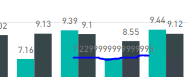
After contacting support, they gave me an workaround to change data label property to configure "decimal" value from Auto to 2, and it shows correctly then.
However, why it picked up a wrong data from data source is a problem.
Post the issue here and hope it will help others to fix the similar issue.

 on:
Dataflow error communicating with another service
on:
Dataflow error communicating with another service
 yanlinnnaing
on:
Issue: Oracle Cloud Connection created without cen...
yanlinnnaing
on:
Issue: Oracle Cloud Connection created without cen...
 on:
Option to set key column is missing in June 2026 r...
on:
Option to set key column is missing in June 2026 r...