Hello to all! I try to display 2 different symbols in a table depending on a status - here is the small dax function:
test status = SWITCH(TRUE();
    [Projectstatus] = 0; UNICHAR(9940);
    [Projectstatus] = 1; UNICHAR(9989);
    "")
Code works for different unichar-values - it seems to be a problem with the number range that i'm in. It ends in the result that the unichar(9989) is displayed for all rows:
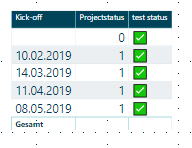
Selecting only the status "0" the result is correct:
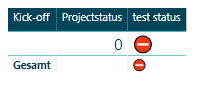
Selecting other values the result is correct:

The current work around is adding a additional character to one of the 2 unichar() expressions:
status char = SWITCH(TRUE();
    AVERAGE(Testtabelle[Status]) = 1; UNICHAR(9989);
    AVERAGE(Testtabelle[Status]) = 0; UNICHAR(9940)&" ";
    ""
)
Howerver not perfect and seems to me like a bug - in case you have any questions feel free to contact me!
Best regards & thx for the fix!
Stephan

 mattlee
on:
Unremovable Scroll Bars
mattlee
on:
Unremovable Scroll Bars
 on:
Gateway 3000.322.4 (June 2026): refreshes failing ...
on:
Gateway 3000.322.4 (June 2026): refreshes failing ...
 on:
Dataflow error communicating with another service
on:
Dataflow error communicating with another service