

- JoseVitorR on: Power Bi Login nao funciona
-
 mattlee
on:
Tooltip sentence mode overrides help tooltip conte...
mattlee
on:
Tooltip sentence mode overrides help tooltip conte...
- RyanH123 on: Sequence contains more than one element June updat...
- abc54 on: Internal error: An unexpected error occurred (file...
-
dzav
 on:
Option to set key column is missing in June 2026 r...
on:
Option to set key column is missing in June 2026 r...
-
mattlee
on:
Default format string locale for dates and numbers...
- Timo_Klein on: Power BI Desktop Snowflake Refresh Fails: “Cannot ...
- NamelessLw on: Losing my mind in Fabric over SFTP & Azure Blob St...
-
 KevinChant
on:
Issues with changing the workspace ID when version...
KevinChant
on:
Issues with changing the workspace ID when version...
- beefbriskets0up on: May 2026 update - default format string locale for...
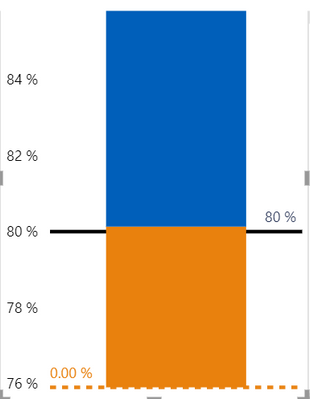
Seems like could find this issue in Power BI Desktop.
If firstly create a constant line in the visual with the blank value measure, the line would not show in the visual;
if create the constant line again in the visual with the blank value measure, it would show the 0 value line.
Have submited this issue internal to confirm(ICM: 277149378), would update here as soon as possible if there is any progress about this issue.
Best Regards,
Community Support Team _ Yingjie Li