FabCon is coming to Atlanta
Join us at FabCon Atlanta from March 16 - 20, 2026, for the ultimate Fabric, Power BI, AI and SQL community-led event. Save $200 with code FABCOMM.
Register now!- Power BI forums
- Get Help with Power BI
- Desktop
- Service
- Report Server
- Power Query
- Mobile Apps
- Developer
- DAX Commands and Tips
- Custom Visuals Development Discussion
- Health and Life Sciences
- Power BI Spanish forums
- Translated Spanish Desktop
- Training and Consulting
- Instructor Led Training
- Dashboard in a Day for Women, by Women
- Galleries
- Data Stories Gallery
- Themes Gallery
- Contests Gallery
- QuickViz Gallery
- Quick Measures Gallery
- Visual Calculations Gallery
- Notebook Gallery
- Translytical Task Flow Gallery
- TMDL Gallery
- R Script Showcase
- Webinars and Video Gallery
- Ideas
- Custom Visuals Ideas (read-only)
- Issues
- Issues
- Events
- Upcoming Events
The Power BI Data Visualization World Championships is back! Get ahead of the game and start preparing now! Learn more
- Power BI forums
- Issues
- Issues : Top Ideas
Share your ideas and vote for future features
- Mark all as New
- Mark all as Read
- Float this item to the top
- Subscribe
- Bookmark
- Subscribe to RSS Feed

-
APIS and Embedding
-
APIS and Embedding

-
APIS and Embedding
Hi @Anonymous ,
Firstly, it’s by design that report in Power BI service may slow than it opened in Power BI Desktop. The reason is that the resource needed to load the report is dedicated when opening the report on a specific local machine, but for report in Service, especially when the report is resided in Shared capacity but not Premium capacity(for Premium capacity, there will be a diamond icon beside its name), resources are used by all the users located at same region or in the same organization. In addition, there are many factors may cause the slow report. To troubleshoot report performance in Power BI, we provide an official document to help you. For more details, please refer to Troubleshoot report performance in Power BI - Power BI | Microsoft Docs.

Best Regards,
Community Support Team _ Caiyun
-
APIS and Embedding
-
Dashboards
-
Reports
it gets stuck on the email screen, click enter on the email screen and back to the same screenDid you mean when you entered the e-mail address and clicked the 'Contintue' button, it got stuck?
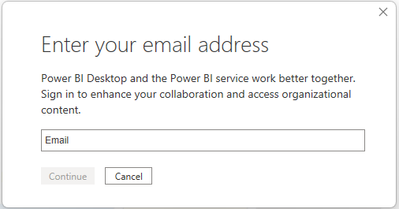
Or you can click the 'Contintue' button and to the sign in page but could not sign in your account?
Please consider providing more details about this issue:
- The version of Power BI Desktop where the issue happened, have you tried the latest version?
- Did this issue happen recently but it works previously?
- Did this issue happen only on this account or any other accounts?
Best Regards,
Community Support Team _ Yingjie Li
-
APIS and Embedding

-
APIS and Embedding
-
APIS and Embedding

Update:
This issue will be fixed in 3 weeks update.
Best Regards,
Community Support Team _ Yingjie Li
-
APIS and Embedding
-
Reports
-
APIS and Embedding
-
Reports
Hi,
Whether there is the detailed error message in refresh history or gateway settings when refresh failed, you can click 'Show details' in these panes to find it and paste it to the case reply in the format of text.
Thank you very much!
Best Regards,
Community Support Team _Robert Qin
-
APIS and Embedding
Hi,
According to my research, a similar issue has been reported internally, so stay tuned.
Problem description: Cx downloaded the latest version Power BI Desktop from Microsoft Download Center and found the version displayed in Desktop is wrong after installation.
ICM: 289626619
I will update here once I get any information.
Thank you very much!
Best Regards,
Community Support Team _Robert Qin
-
APIS and Embedding
-
Content Packs
-
Custom Visuals
-
Dashboards
-
Data Modeling
-
Gateways
-
Mobile
-
Report Server
-
Reports

Hi @hervekoap
Please run the following command to get the dataflow id but not the dataset id after you sign in to Power BI service with ‘Connect-PowerBIServiceAccount’.
Get-PowerBIDataflow -Scope Organization
After that, run the command of exporting dataflow.
Export-PowerBIDataflow -Id [dataflow id] -Scope Organization -OutFile tt.txt
For more details about these two cmdlets, please refer to Get-PowerBIDataflow (MicrosoftPowerBIMgmt.Data) | Microsoft Docs and Export-PowerBIDataflow (MicrosoftPowerBIMgmt.Data) | Microsoft Docs.
Best Regards,
Community Support Team _ Caiyun
-
APIS and Embedding
 on
08-17-2017
11:15 AM
on
08-17-2017
11:15 AM
-
APIS and Embedding
Hi @flextry
To use this REST API, you need Premium license. If you run it with Pro or Premium Per User license, you will get such kind of errors.
{"error":{"code":"FeatureNotAvailableError","pbi.error":{"code":"FeatureNotAvailableError","parameters":{},"details":[]}}}
To learn the details of how to use this REST API, please refer to this blog: How to use Power BI Rest API to export the Power B... - Microsoft Power BI Community.
Best Regards,
Community Support Team _ Caiyun
-
APIS and Embedding
-
Reports

Hi @Swayam
I’ve tried to connect to Google Sheets with Google Sheets(Beta) connector in Jan 2022 Power BI Desktop(It’s the latest version of Desktop that I can get from Microsoft Download Center), but I can connect successfully with no problems.

According to the screenshot, it shows that you aren’t signed in to this data source. May I know whether you have clicked on the Sign in button and input your credential in the opened authentication window or page? If you do this kind of operation, what will happen?
In addition, please check in Data source settings whether there is a record for your Google Sheets data source? If it does, please Clear Permissions for it. After that, try to connect and sign in to this data source again.


Best Regards,
Community Support Team _ Caiyun
-
APIS and Embedding
-
Report Server
-
Reports
 on
08-17-2017
08:12 AM
on
08-17-2017
08:12 AM
-
APIS and Embedding

 chshiv
on
02-10-2022
04:34 PM
chshiv
on
02-10-2022
04:34 PM
Whether considering providing more details about this issue, for example, the data source of the .rdl file, whether you have embeded it in Power BI Playground etc.
In addition, since it would get error message on Power BI Playground, you can share the whole error message about it.
Best Regards,
Community Support Team _ Yingjie Li
-
APIS and Embedding

Hi @chenghung
In addition to BigQuery, may I know what is the another data source? Have you ever checked how many rows in your data source? After connecting to these data source, did you do any transformations in Power Query? Did you do any interactions before you get this error in the Embedded environment?
Best Regards,
Community Support Team _ Caiyun
-
APIS and Embedding

-
APIS and Embedding
-
APIS and Embedding
- New 8,246
- Needs Info 3,502
- Investigating 3,602
- Accepted 2,089
- Declined 38
- Delivered 3,975
Helpful resources
- YacAaz on: Combo chart - custom data label for line chart not...
- kevinlewis56 on: Request for PL-300 Exam Voucher Extension Due to H...
-
 Hongju_Jung
on:
Translation Issue in the Korean Version
Hongju_Jung
on:
Translation Issue in the Korean Version
- Nameless_LW on: Unable to find latest powerbi gateway STANDARD MOD...
- djordje369 on: Installing an update from template app fails
-
Hongju_Jung
on:
A Typo about Visual Gridline in the View menu (Kor...
- jake18 on: Fix High Vulnerabilities found in On-Prem Data Gat...
- BI_Tiffin on: Power BI Azure Map - Connecticut Geocoding Ambigui...
-
acig
 on:
Issue with new card visual - reference labels spac...
on:
Issue with new card visual - reference labels spac...
- catsamson on: Issues with new card visual displaying an URL imag...
-
Reports
10,355 -
Data Modeling
4,192 -
Dashboards
4,147 -
Report Server
2,131 -
Gateways
2,130 -
APIS and Embedding
1,981 -
Custom Visuals
1,808 -
Content Packs
528 -
Mobile
354 -
Need Help
12 -
General Comment
7 -
Show and Tell
3 -
Tips and Tricks
2 -
Power BI Desktop
1