When plotting R Script Visual, Power BI seems to output all the columns related to a .csv(UTF-8 encoding) file, then read the data into R with "read.csv" function.
The function is like this:
`dataset` = read.csv('C:/Users/***/REditorWrapper_5c23c015-1ba8-4bb0-a824-3f8179725132/input_df_73ea8250-a892-46d5-8e7d-c38f5993bbed.csv', check.names = FALSE, encoding = "UTF-8", blank.lines.skip = FALSE)
When handling data with Chinese characters, this line of code may cause a serious problem, that R cannot read the data correctly.
Mainly, R will fail to separate the data using commas. The correct way of handling UTF-8 encoded '.csv' file is to replace
encoding = 'UTF-8'
with
fileEncoding = 'UTF-8'
See this file for example https://1drv.ms/u/s!An3qTCClETscjq41_6sBSz5RlJ2C0w
This is the original data:
 Original Data
This is the data loaded into R using ’read.csv‘ with encoding = "UTF-8", which apparently is wrong. This seems to be the way that R handles the data when collaborating with PowerBI...
 Data loaded into R
If I change the code in REditorWrapper.R to fileEncoding = "UTF-8", it could be fixed. However, I haven't figure out how to alter the code to fix the problem in R Script Visual... The way R load the data is handled by BI right now.
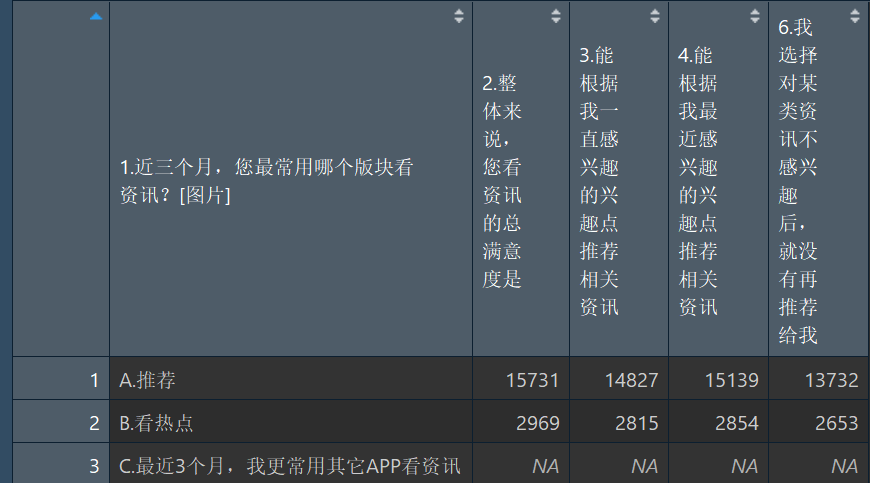 Fixed
Fixed
Fixed

 Hongju_Jung
on:
Translation Issue in the Korean Version
Hongju_Jung
on:
Translation Issue in the Korean Version
 on:
Issue with new card visual - reference labels spac...
on:
Issue with new card visual - reference labels spac...