I have a nagging issue that seems to be causing real heartache with users of Power BI. A value change in a slicer will cause a table visual to re-render the data with the Slicer filter applied - but not at the top of the table - In the below image - The change will ALWAYS cause the table to fall short of the top - If a user is not paying attention - they will make bad assumption that the first record being displayed is the first record in the table - really bad if the data is sorted by value.
The below has the table on left before a slicer is applied - then after then after slicer is applied the table on right is displaying the data... but NOT from the top of the table. Seems like the #1 dropping account is -55%... but it's not if you scroll up - very...very dangerous to our end users - a risk of walking away with the wrong answer here.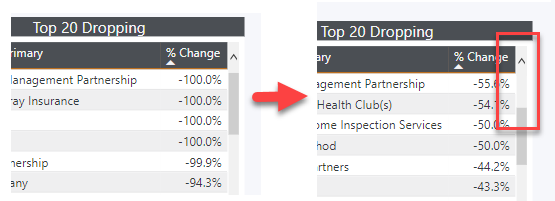

 mattlee
on:
Unremovable Scroll Bars
mattlee
on:
Unremovable Scroll Bars
 on:
Gateway 3000.322.4 (June 2026): refreshes failing ...
on:
Gateway 3000.322.4 (June 2026): refreshes failing ...