Hello,
I noticed one strange thing in Report level filters behavior.
To reproduce that, let's have a look at a very simple model of one table:
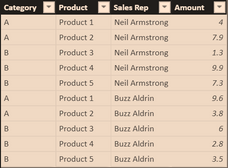
We have 3 measures defined:
[Sales] 			= SUM('Sales Table'[Amount])
[Sales All Sales Categories] 	= CALCULATE([Sales], ALL('Sales Table'[Category]) )
[Sales All Sales Table] 	= CALCULATE([Sales], ALL('Sales Table') )
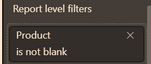
Also, I have a Report level filter applied. I am using "is not blank", so nothing actually is being filtered out. The issue is also reproduced with any filter applied on Product Column.
Everything is OK until a filter on Category is applied.
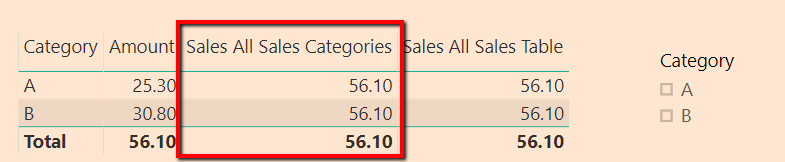

As you can see measure [Sales All Sales Categories] fails to show values for all categories. But when I remove Report level filter on Products everything starts to work as expected.
I think that is because of SummarizeColumns function. Here are 2 DAX expressions that are returning different results: one is with SummarizeColumns, the other is the same, but written with Summarize/AddColumns.
EVALUATE
SUMMARIZECOLUMNS (
    'Sales Table'[Category],
    TREATAS ( { "A" }, 'Sales Table'[Category] ),
    FILTER (
        KEEPFILTERS ( VALUES ( 'Sales Table'[Product] ) ),
        NOT ( ISBLANK ( 'Sales Table'[Product] ) )
    ),
    "x", CALCULATE ( SUM ( 'Sales Table'[Amount] ), ALL ( 'Sales Table'[Category] ) )
)
EVALUATE
CALCULATETABLE (
ADDCOLUMNS (
SUMMARIZE ( 'Sales Table', 'Sales Table'[Category] ),
"x", CALCULATE ( SUM ( 'Sales Table'[Amount] ), ALL ( 'Sales Table'[Category] ) )
),
TREATAS ( { "A" }, 'Sales Table'[Category] ),
FILTER (
KEEPFILTERS ( VALUES ( 'Sales Table'[Product] ) ),
NOT ( ISBLANK ( 'Sales Table'[Product] ) )
)
)You can find a file here:
https://1drv.ms/u/s!AmpFsJc0QFFjlT7EzfwfoVMs6MwF
Any thoughts on this? To me seems like a bug.
Thank you.

 Hongju_Jung
on:
Translation Issue in the Korean Version
Hongju_Jung
on:
Translation Issue in the Korean Version
 on:
Issue with new card visual - reference labels spac...
on:
Issue with new card visual - reference labels spac...