Hi all,
I have some problems with the advanced date filtering in PowerBi Services. These problems are only in PowerBi Services and not in PowerBi Desktop. There everything works fine.
We are experiencing following problem with the advaced date filtering in PowerBi Services since some days:
1.The displayed date-format in the filter is: dd.MM.yyyy (as shown in the screenshot) but inserting a date only works if I'm inserting in following format: MM/dd/yyyy
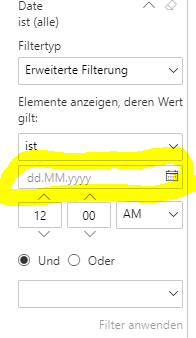
2. If I'm choosing a date from the date-picker, I can select the date, then the correct date gets selected (display in the date-field in the MM/dd/yyyy, which shouldn't be like that), but when I open the datepicker again the reversed month/dates are selected. (If I have selected 6. august after reopening the datepicker 8.june is marked/selected)
3. Inserting a date in the displayed fromat dd.mm.yyyy dosent work. (Using . as separator) If I'm inserting the date with / as separtor in following format dd/mm/yyyy it gets automatically reversed to mm/dd/yyyy
4. Changing the time by up/down arrow changes the month and days in the date field. dd/mm to mm/dd and reverse
Could you please help me with that.
Thanks,
Max


 mattlee
on:
Tooltip sentence mode overrides help tooltip conte...
mattlee
on:
Tooltip sentence mode overrides help tooltip conte...
 on:
Option to set key column is missing in June 2026 r...
on:
Option to set key column is missing in June 2026 r...
 KevinChant
on:
Issues with changing the workspace ID when version...
KevinChant
on:
Issues with changing the workspace ID when version...