For a while, I and others were having issues re-uploading our reports after refreshing the data. We would get an error that it couldn't be uploaded because it already existed. The only fix was to go up to the account link, select switch account, and sign back into the same account. It would then give the option to replace the existing data, and would upload fine. The June update appeared to have fixed this problem. Until today.
I am now getting a new error message. The error is the wrong error message. It has nothing to do with what it says.
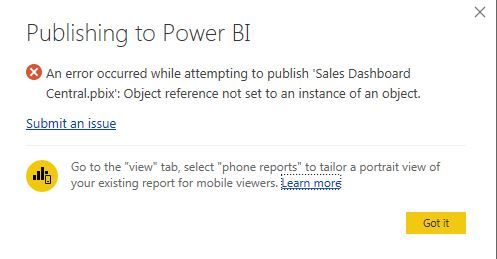
Again, the actual error has nothing to do with what it says. It has effectively replaced the error I used to receive, saying that the report already existed, and not giving me the option to replace it. The fix is the same. I tried looking for issues with reference tables, and this happens with any and all of my reports. My relationships are fine. There is no reference error. If I select my account, choose the option to switch accounts, and sign back into the same account, I have the option once again to replace the data, and the data is uploaded properly and the report functions just fine on the web portal.
The error report is erroneous, and while I can live with the work around, it is massively time consuming given the number of reports I publish and update on a weekly basis.

 mattlee
on:
Unremovable Scroll Bars
mattlee
on:
Unremovable Scroll Bars
 on:
Gateway 3000.322.4 (June 2026): refreshes failing ...
on:
Gateway 3000.322.4 (June 2026): refreshes failing ...
 on:
Dataflow error communicating with another service
on:
Dataflow error communicating with another service