I've tried it several times - any idea, how to solve this?
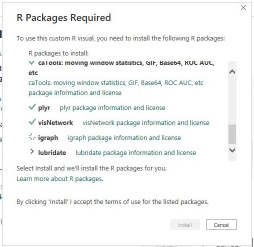
Feedback Type:
Frown (Error)
Timestamp:
2023-02-24T15:18:55.4582171Z
Local Time:
2023-02-24T16:18:55.4582171+01:00
Session ID:
b1aa4dcd-51ae-4caa-9f95-6832d10bd7d3
Release:
February 2023
Product Version:
2.114.864.0 (23.02) (x64)
Stack Trace:
Microsoft.PowerBI.Scripting.R.Exceptions.RFailedToInstallDependencyException
at Microsoft.PowerBI.Scripting.R.Dependecies.RDependenciesWrapper.InstallDependency(String packageName, Int32 attempt)
at System.Threading.Tasks.Task.Execute()
--- End of stack trace from previous location where exception was thrown ---
at System.Runtime.ExceptionServices.ExceptionDispatchInfo.Throw()
at Microsoft.PowerBI.Client.Windows.FloatingDialog.KoInstallRDependenciesDialog.<>c__DisplayClass16_0.<<OnOkButtonPressed>b__0>d.MoveNext()
--- End of stack trace from previous location where exception was thrown ---
at System.Runtime.ExceptionServices.ExceptionDispatchInfo.Throw()
at System.Runtime.CompilerServices.TaskAwaiter.HandleNonSuccessAndDebuggerNotification(Task task)
at Microsoft.PowerBI.Client.Windows.IExceptionHandlerExtensions.<HandleAwaitableAsyncExceptions>d__1.MoveNext()
Error Code:
-2147467259 (0x80004005)
PowerBINonFatalError:
{"AppName":"PBIDesktop","AppVersion":"2.114.864.0","ModuleName":"Microsoft.PowerBI.Scripting.dll","Component":"Microsoft.PowerBI.Scripting.R.Dependecies.RDependenciesWrapper","Error":"Microsoft.PowerBI.Scripting.R.Exceptions.RFailedToInstallDependencyException","MethodDef":"InstallDependency","ErrorOffset":"118"}
InnerException0.Stack Trace:
at Microsoft.PowerBI.Scripting.R.RScriptWrapper.RunScript(String originalScript, Int32 timeoutMs)
at Microsoft.PowerBI.Scripting.R.Dependecies.RDependenciesWrapper.InstallDependency(String packageName, Int32 attempt)
OS Version:
Microsoft Windows NT 10.0.19044.0 (x64 de-DE)
CLR Version:
4.8 or later [Release Number = 528372]
Peak Virtual Memory:
71.4 GB
Private Memory:
784 MB
Peak Working Set:
933 MB
IE Version:
11.789.19041.0
User ID:
02015d65-50c2-44c4-b593-f6288dcd6913
Workbook Package Info:
1* - en-US, Query Groups: 12, fastCombine: Disabled, runBackgroundAnalysis: False.
Telemetry Enabled:
True
Model Default Mode:
Import
Model Version:
PowerBI_V3
Enabled Preview Features:
PBI_enableWebView2
PBI_sparklines
PBI_scorecardVisual
PBI_fieldParametersSuperSwitch
PBI_horizontalFusion
PBI_relationshipEditPane
PBI_setLabelOnExportPdf
Disabled Preview Features:
PBI_shapeMapVisualEnabled
PBI_SpanishLinguisticsEnabled
PBI_qnaLiveConnect
PBI_azureMapVisual
PBI_compositeModelsOverAS
PBI_b2bExternalDatasetSharing
PBI_enhancedTooltips
PQ_WebView2Connector
PBI_NlToDax
PBI_optimizeTabRibbon
PBI_angularRls
Disabled DirectQuery Options:
TreatHanaAsRelationalSource
Cloud:
GlobalCloud
DPI Scale:
100%
Supported Services:
Power BI

 KevinChant
on:
Issues with changing the workspace ID when version...
KevinChant
on:
Issues with changing the workspace ID when version...
 on:
app.powerbi.com down?
on:
app.powerbi.com down?
 DataZoe
on:
Set as landing page feature missing in Apr 2026 up...
DataZoe
on:
Set as landing page feature missing in Apr 2026 up...
 on:
Template App "Microsoft 365 Usage Analytics" faili...
on:
Template App "Microsoft 365 Usage Analytics" faili...