cancel
Showing results for 
Search instead for 
Did you mean: 

The FabCon + SQLCon recap series starts April 14th at 8am Pacific. If you’re tracking where AI is going inside Fabric, this first session is a can't miss. Register now

Lost buttons of Add Conditional Column when adding multiple conditions

Hi team,


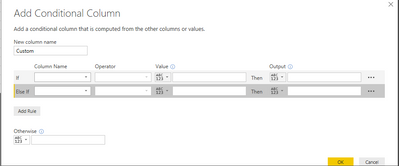
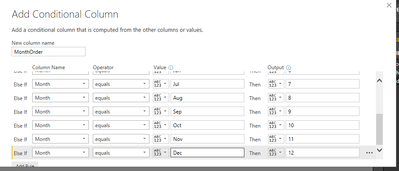
In Add Conditional Column dialog, if I add multiple condition, the OK and Cancel button will be pushed down to the bottom. So I could not click OK or Cancel (but could press ENTER as workaround)


Screenshot 2017-01-18 20.00.50.pngScreenshot 2017-01-18 20.00.09.png

Status: Needs Info
Comments
v-haibl-msft
Microsoft Employee

@tringuyenminh92


I cannot repro the issue in Jan 2017 version of Power BI Desktop. Is there any other configuration I missed here?


Lost buttons of Add Conditional Column when adding multiple conditions_1.jpg


Best Regards,

Herbert

Vicky_Song
Impactful Individual
Status changed to: Needs Info
 
tringuyenminh92
Memorable Member

 Sorry for late response, network in my hometown is so terrible today :(. I have double checked today, with version Version: 2.42.4611.482 64-bit (January, 2017). Is there any information or steps that you want me to do for collecting information (logs,..)


Screenshot 2017-01-20 20.14.29.pngScreenshot 2017-01-20 20.14.36.png

v-haibl-msft
Microsoft Employee

@tringuyenminh92


Maybe you can try the latest 2.42.4611.901. It looks like you’re using PBI Desktop in Win2012R2, and I also have tried on it but still cannot repro the same issue.


Best Regards,

Herbert

tringuyenminh92
Memorable Member

Hi @v-haibl-msft,


It's windows server 2012 build 9200, i have tried with 2.42.4611.901 (PBIDesktop) (x64). but it's same issue. There is one notice that there is warning popup when i click edit queries. 


there is a warning popup when i click Edit Queriesthere is a warning popup when i click Edit QueriesScreenshot 2017-01-24 17.58.40.pngScreenshot 2017-01-24 17.58.49.pngScreenshot 2017-01-24 17.59.35.png 


This is my session information: 


Spoiler

Feedback Type:

Frown (Error)


Timestamp:

2017-01-24T10:59:44.7693777Z


Local Time:

2017-01-24T17:59:44.7693777+07:00


Product Version:

2.42.4611.901 (PBIDesktop) (x64)


Release:

January 2017


IE Version:

10.0.9200.16384


OS Version:

Microsoft Windows NT 6.2.9200.0 (x64 en-US)


CLR Version:

4.6.1 or later [Release Number = 394271]


Workbook Package Info:

1* - en-US, fastCombine: Disabled.


Peak Working Set:

468 MB


Private Memory:

301 MB


Peak Virtual Memory:

1.73 GB


User ID:

132fc641-988d-4ae9-8d0d-4b054279113c


Session ID:

a59299b0-1044-4e48-9f25-00a2383ae62b


Telemetry Enabled:

True


Model Default Mode:

Import


Snapshot Trace Logs:

C:\Users\pbix\AppData\Local\Microsoft\Power BI Desktop\FrownSnapShot1601501793.zip


Performance Trace Logs:

C:\Users\pbix\AppData\Local\Microsoft\Power BI Desktop\PerformanceTraces.zip


Disabled Preview Features:

PBI_RedShift

PBI_Impala

PBI_Snowflake

PBI_shapeMapVisualEnabled

PBI_allowBiDiCrossFilterInDirectQuery

PBI_clusteringEnabled

PBI_esriEnabled


Disabled DirectQuery Options:

DirectQuery_Unrestricted


Cloud:

GlobalCloud


DPI Scale:

100%


Supported Services:

Power BI


Formulas:


section Section1;


shared Table1 = let

    Source = Table.FromRows(Json.Document(Binary.Decompress(Binary.FromText("i44FAA==", BinaryEncoding.Base64), Compression.Deflate)), let _t = ((type text) meta [Serialized.Text = true]) in type table [Column1 = _t]),

    #"Changed Type" = Table.TransformColumnTypes(Source,{{"Column1", type text}})

in

    #"Changed Type";

Hope it's useful for you ^_^

v-haibl-msft
Microsoft Employee

@tringuyenminh92


How about the result if you add the website into Trusted sites zone?

I also suggest you to create a support ticket at http://support.powerbi.com (see bottom of page) since it seems to be machine specific.


Best Regards,

Herbert