I'm able to produce a very useful line and stacked column chart showing me categorical actuals as the stacked column against an overall goal as my line goal. In addition, I have added a line value with the total actuals to show atop the stacked columns. To do this, I have customized the series for my lines and set the stroke width to 0 (for the actuals) in order to remove the line and I have turned "Off" the "Show marker" option for the actuals data set.
However, when I do this, I am seeing 1 marker. I have done this for 5 charts and in 3 of the charts, there is only 1 marker showing. All of the settings (as indicated above) are set the same way.
This seems like a bug. Can this be investigated?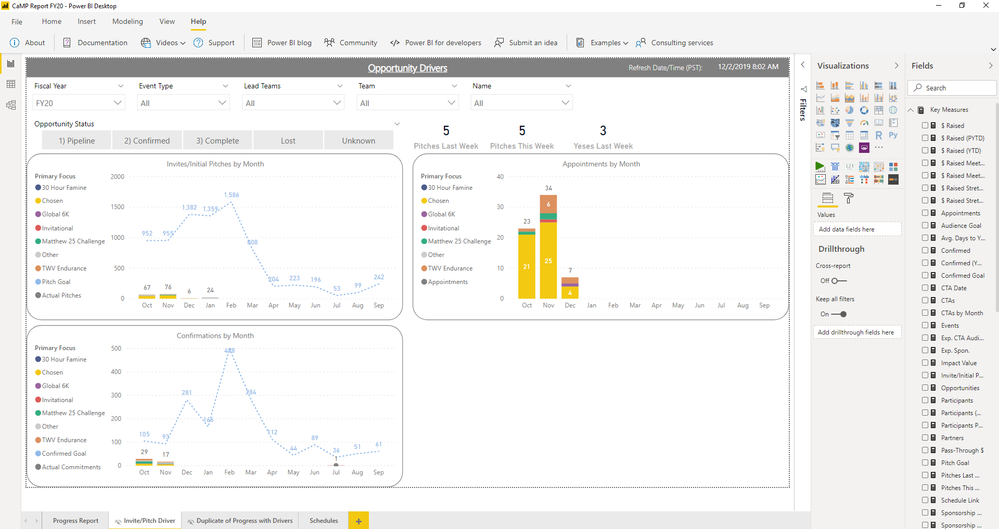


 on:
app.powerbi.com down?
on:
app.powerbi.com down?
 DataZoe
on:
Set as landing page feature missing in Apr 2026 up...
DataZoe
on:
Set as landing page feature missing in Apr 2026 up...
 on:
Template App "Microsoft 365 Usage Analytics" faili...
on:
Template App "Microsoft 365 Usage Analytics" faili...