
- nharding1 on: Power BI Azure maps legend colours issue
- getsmithed on: Dynamic Subscription Sent Default Page instead of ...
- paulbodman on: PowerBI Online - Line/ Area Chart Issue after the ...
-
 mattlee
on:
Unremovable Scroll Bars
mattlee
on:
Unremovable Scroll Bars
- _Airat_ on: Card Visual -> Reference ->Details -> Background -...
- _Airat_ on: Slicer's drop-down list covers the Data pane
- Chetanpanwar on: Potential Microsoft Fabric Copy Job Issue – Increm...
-
Aaryan_23
 on:
Gateway 3000.322.4 (June 2026): refreshes failing ...
on:
Gateway 3000.322.4 (June 2026): refreshes failing ...
- _Airat_ on: PowerBI There's not enough memory to complete this...
- ex_kjetilh on: æøå not supported after update 30th june?
Hi @Pizza__,
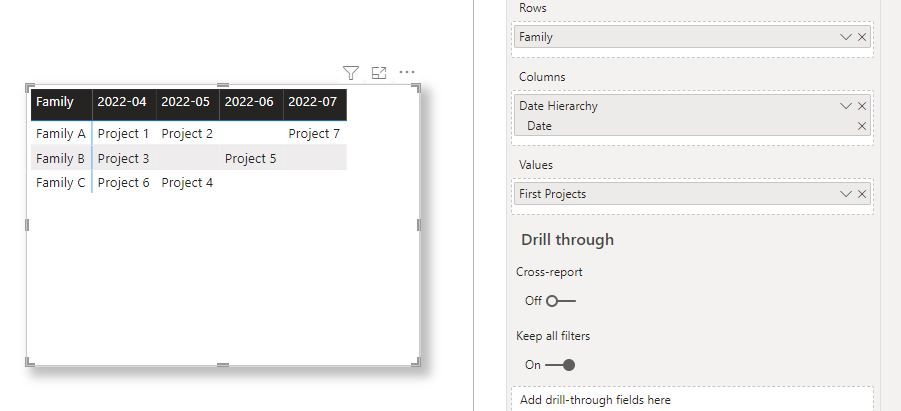
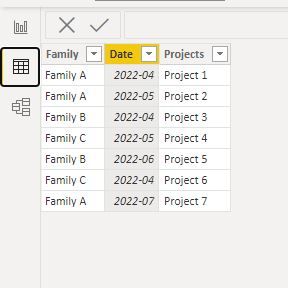
For matrix visual, the expected values are some aggregated values. Normally, we use some fields containing numeric values, measures, or calculated columns as matrix values. And if you drag a field whose data type is Text, then Power BI will automatically choose a proper aggregate type for your Text column, as you can see First.
Work with aggregates (sum, average, and so on) in Power BI - Power BI | Microsoft Docs
If you would like to display multiple values by column, unfortunately, according to the design, you couldn’t get what you want with matrix visual. So I would suggest you display all your table values with Table visual.
Best Regards,
Community Support Team _ Caiyun