


-
 KevinChant
on:
Issues with changing the workspace ID when version...
KevinChant
on:
Issues with changing the workspace ID when version...
- kdrinnonLex on: BUG: Fabric pipelines stored procedure activity do...
-
JoshT
 on:
app.powerbi.com down?
on:
app.powerbi.com down?
-
 DataZoe
on:
Set as landing page feature missing in Apr 2026 up...
DataZoe
on:
Set as landing page feature missing in Apr 2026 up...
-
RossEdwards
 on:
Template App "Microsoft 365 Usage Analytics" faili...
on:
Template App "Microsoft 365 Usage Analytics" faili...
- NicoData on: “Filters on all pages” disappear from filter pane ...
- Tortitude on: No able to access Microsoft UI String Search page
- dcullen on: Gateway 3000.314.5 - Microsoft.Mashup.Container.Ne...
-
mattlee
on:
Input Text Slicer Broken on PBI Services
-
mattlee
on:
Input Slicer Bug: Cursor jumps to position 0 and v...
Hi @rdnguyen,
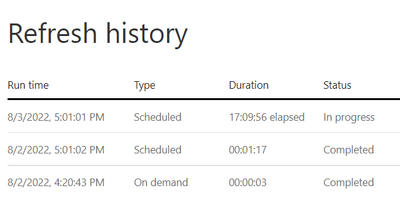
When you see your dataflow stuck in long refresh, you could take Dataflows - Get Dataflow Transactions api to check the refresh of your dataflow. If it does suck in refresh, you could use Dataflows - Cancel Dataflow Transaction - REST API (Power BI Power BI REST APIs) | Microsoft Docs api to cancel its refresh. After that, you could relaunch refresh by Dataflows - Refresh Dataflow - REST API (Power BI Power BI REST APIs) | Microsoft Docs api or wait for the next scheduled refresh.
For long running refresh or refresh stuck issues of dataflows, the product group is working on the improvements for it. But if you get such kind of issue, please consider the workaround mentioned as follows.
Best Regards,
Community Support Team _ Caiyun