
-
 mattlee
on:
Tooltip sentence mode overrides help tooltip conte...
mattlee
on:
Tooltip sentence mode overrides help tooltip conte...
- RyanH123 on: Sequence contains more than one element June updat...
- abc54 on: Internal error: An unexpected error occurred (file...
-
dzav
 on:
Option to set key column is missing in June 2026 r...
on:
Option to set key column is missing in June 2026 r...
-
mattlee
on:
Default format string locale for dates and numbers...
- Timo_Klein on: Power BI Desktop Snowflake Refresh Fails: “Cannot ...
- NamelessLw on: Losing my mind in Fabric over SFTP & Azure Blob St...
-
 KevinChant
on:
Issues with changing the workspace ID when version...
KevinChant
on:
Issues with changing the workspace ID when version...
- beefbriskets0up on: May 2026 update - default format string locale for...
-
mattlee
on:
Default Locale and "None" Display Units should be ...
Hi @Mike01,
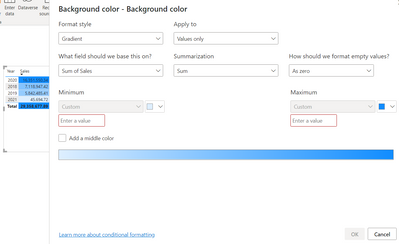
When you specify the Minimum the Maximum as Custom, you need to input min and max value that you want in the input box below. Then, the OK button will be bright and can be clicked.
Best Regards,
Community Support Team _ Caiyun