When you have a scatter chart with auto scaling and one of the bubbles happens to be near the edge of the chart, then part of this bubble is truncated. See example below:
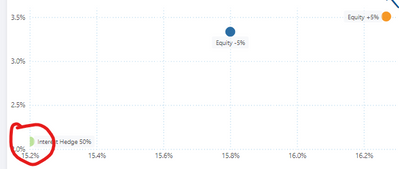
This looks bad, particularly when the size of the bubble is set somewhat bigger (f.e. 24 points as in example below).
Expected behaviour: the auto scaling takes into account the size of the bubble, so it will not be truncated.
PS: this may seem to be an edge case, but in fact happens quite often if the number of observations in the scatter chart is relatively low. Which is exaclty the use case in which you typically want to use a large bubble size.

 on:
Issue with new card visual - reference labels spac...
on:
Issue with new card visual - reference labels spac...
 mattlee
on:
Issue with new card visual after publishing to PBI...
mattlee
on:
Issue with new card visual after publishing to PBI...
 on:
Issue with Card Visual Layout After November Power...
on:
Issue with Card Visual Layout After November Power...
 on:
Adding a measure or column as a tooltip to an Azur...
on:
Adding a measure or column as a tooltip to an Azur...