I tried to import some custom visuals from the Microsoft Visual Store but every time I tried to import one, I get the following error message:
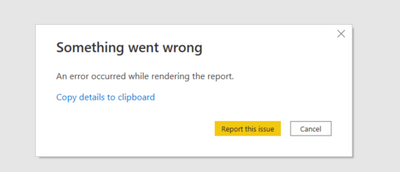
It does not matter which custom visual I try to import and it also does not matter if I try to import it in an existing dashboard or in a completely new one. Is there an issue with the Store maybe?
Following error message I also got:
Stack Trace:
Javascript: TypeError
at MarketplaceProductsHostService.<anonymous> (https://ms-pbi.pbi.microsoft.com/minerva/scripts/desktop.js:123260:93)
at https://ms-pbi.pbi.microsoft.com/minerva/scripts/desktop.js:2952:43
at Object.next (https://ms-pbi.pbi.microsoft.com/minerva/scripts/desktop.js:2963:26)
at fulfilled (https://ms-pbi.pbi.microsoft.com/minerva/scripts/desktop.js:2867:44)
at ZoneDelegate.invoke (https://ms-pbi.pbi.microsoft.com/minerva/scripts/desktop.js:110474:180)
at Object.onInvoke (https://ms-pbi.pbi.microsoft.com/minerva/scripts/desktop.js:21452:64)
at ZoneDelegate.invoke (https://ms-pbi.pbi.microsoft.com/minerva/scripts/desktop.js:110474:68)
at Zone.run (https://ms-pbi.pbi.microsoft.com/minerva/scripts/desktop.js:110337:59)
at https://ms-pbi.pbi.microsoft.com/minerva/scripts/desktop.js:110922:50
at ZoneDelegate.invokeTask (https://ms-pbi.pbi.microsoft.com/minerva/scripts/desktop.js:110486:193)
PowerBINonFatalError:
{"AppName":"PBIDesktop","AppVersion":"2.100.1401.0","ModuleName":"https://ms-pbi.pbi.microsoft.com/minerva/scripts/desktop.js","Component":"MarketplaceProductsHostService","Error":"TypeError","MethodDef":"<anonymous>","ErrorOffset":"123260:93"}
Thanks in advance!
Kind regards

 on:
Unremovable Scroll Bars
on:
Unremovable Scroll Bars
 DataZoe
on:
Slicer's drop-down list covers the Data pane
DataZoe
on:
Slicer's drop-down list covers the Data pane
 on:
Gateway 3000.322.4 (June 2026): refreshes failing ...
on:
Gateway 3000.322.4 (June 2026): refreshes failing ...
Hi,
According to my test, I can successfully import the custom visual to my Power BI desktop:
What’s the kind of custom visual you wanted to import?
I suggest you to update to the latest version of the Power BI desktop and check if this problem can disappear.
Thank you very much!
Best Regards,
Community Support Team _Robert Qin