I noticed when I published a report with an on-premise data source (SAP BW) along with cloud data sources (Sharepoint), the Apply button is greyed out in the gateway connection settings:
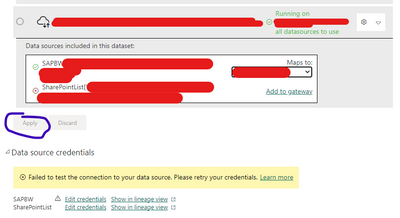
Again, this is only applicable to newly published datasets.
For the existing ones, there are no errors, and I can refresh successfully. Like this one, it has actually the same setup, just published in a different workspace some time ago:

I just experienced this yesterday.
Any of you are experiencing it now?
Appreciate the responses!
EDITED--
Check out the comments for the workaround
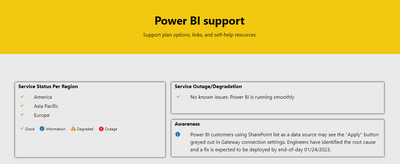
Microsoft has also posted the issue on the Power BI Support page. Expect the fix to be on 24th of January

 Hongju_Jung
on:
A Typo about Visual Gridline in the View menu (Kor...
Hongju_Jung
on:
A Typo about Visual Gridline in the View menu (Kor...
 on:
Issue with new card visual - reference labels spac...
on:
Issue with new card visual - reference labels spac...
 on:
Issue with Card Visual Layout After November Power...
on:
Issue with Card Visual Layout After November Power...