I'm having troubling trying to incorporate a custom geo coding function for coordinates in one of my heacount files. The function works and retrieves latitude and longitude data. However, I am encountering the error message below for a different data table. The “Student ID Key” table only has one column (Student ID), made up of the unique Student ID values for each of the last several academic years. I’m not exactly sure what the cause of the issue as since I did not make any changes to the Student ID Key table at all when I created the new web query for the geo code function.
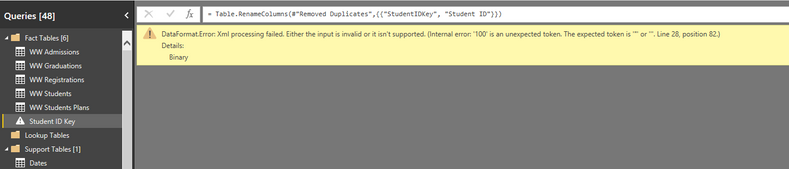
I've already encountered the error below when I try to push the data through to the data/report viewin Power BI.
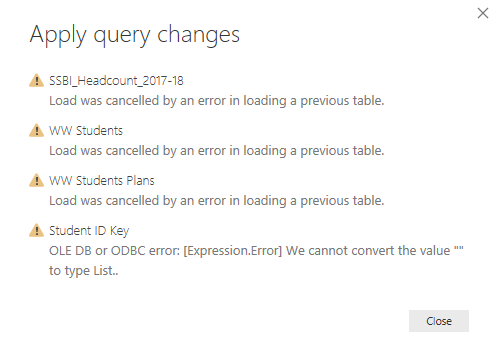 When I tried refreshing the report by "Applying the Changes", I get this error.
Is there a workaround to be able to recreate the web query and function on the data/report view side in Power BI instead of the query editor?

 on:
Dataflow error communicating with another service
on:
Dataflow error communicating with another service
 yanlinnnaing
on:
Issue: Oracle Cloud Connection created without cen...
yanlinnnaing
on:
Issue: Oracle Cloud Connection created without cen...
 on:
Option to set key column is missing in June 2026 r...
on:
Option to set key column is missing in June 2026 r...