When I select an item from the table, all visuals fail. same an all tabs, report was functioning normally yesterday
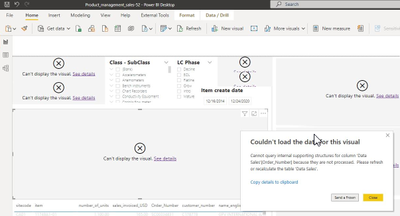
Feedback Type:
Frown (Error)
Timestamp:
2022-01-05T15:43:17.9371156Z
Local Time:
2022-01-05T10:43:17.9371156-05:00
Session ID:
465d9882-9521-4a1d-89ea-0deb83b60be0
Release:
December 2021
Product Version:
2.100.785.0 (21.12) (x64)
OS Version:
Microsoft Windows NT 10.0.19044.0 (x64 en-US)
CLR Version:
4.7 or later [Release Number = 528372]
Peak Virtual Memory:
57.5 GB
Private Memory:
2.62 GB
Peak Working Set:
2.28 GB
IE Version:
11.789.19041.0
User ID:
5c410b3b-6aaf-4bb7-a748-8aaa7d40f489
Workbook Package Info:
1* - en-US, Query Groups: 1, fastCombine: Disabled, runBackgroundAnalysis: False.
Telemetry Enabled:
True
Model Default Mode:
Import
Model Version:
PowerBI_V3
Enabled Preview Features:
PBI_shapeMapVisualEnabled
PBI_azureMapVisual
PBI_enableWebView2
PBI_sparklines
Disabled Preview Features:
PBI_SpanishLinguisticsEnabled
PBI_qnaLiveConnect
PBI_dataPointLassoSelect
PBI_compositeModelsOverAS
PBI_dynamicParameters
PBI_enhancedTooltips
PQ_WebView2Connector
PBI_useModernFormatPane
PBI_scorecardVisual
Disabled DirectQuery Options:
TreatHanaAsRelationalSource
Cloud:
GlobalCloud
DPI Scale:
100%
Supported Services:
Power BI


 KevinChant
on:
Issues with changing the workspace ID when version...
KevinChant
on:
Issues with changing the workspace ID when version...
 mattlee
on:
Default Locale and "None" Display Units should be ...
mattlee
on:
Default Locale and "None" Display Units should be ...
 on:
app.powerbi.com down?
on:
app.powerbi.com down?
 on:
Template App "Microsoft 365 Usage Analytics" faili...
on:
Template App "Microsoft 365 Usage Analytics" faili...
Hi,
Unfortunately, I can’t reproduce the same issue as yours.
I have reported this issue internally, ICM: 267874066
According to my research, there is a similar issue has been reported internally which has been resolved.
Here’s the solution to this ICM:
changed the setting of the column to true and that has solved the problem.
If you still have a problem, I suggest you to open a support ticket to get direct help from the technical support team of Microsoft.
https://community.powerbi.com/t5/Community-Blog/How-to-create-a-support-ticket-in-Power-BI/ba-p/6830...
https://powerbi.microsoft.com/en-us/support/
Thank you very much!
Best Regards,
Community Support Team _Robert Qin