

- YacAaz on: Combo chart - custom data label for line chart not...
- kevinlewis56 on: Request for PL-300 Exam Voucher Extension Due to H...
-
 Hongju_Jung
on:
Translation Issue in the Korean Version
Hongju_Jung
on:
Translation Issue in the Korean Version
- Nameless_LW on: Unable to find latest powerbi gateway STANDARD MOD...
- djordje369 on: Installing an update from template app fails
-
Hongju_Jung
on:
A Typo about Visual Gridline in the View menu (Kor...
- jake18 on: Fix High Vulnerabilities found in On-Prem Data Gat...
- BI_Tiffin on: Power BI Azure Map - Connecticut Geocoding Ambigui...
-
acig
 on:
Issue with new card visual - reference labels spac...
on:
Issue with new card visual - reference labels spac...
- catsamson on: Issues with new card visual displaying an URL imag...
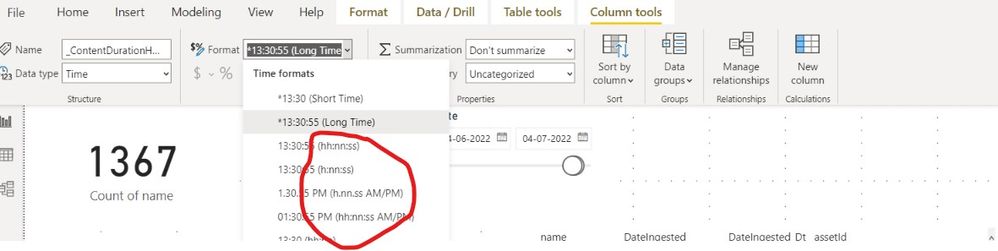
This is by design. Power BI supports custom format strings and has inbuilt default formats but it uses the VBA format string pattern.
Here is the VBA documentation: https://docs.microsoft.com/en-us/office/vba/language/reference/user-interface-help/format-function-v...
Here is the Power BI Documentation: https://docs.microsoft.com/en-us/power-bi/create-reports/desktop-custom-format-strings
In VBA format, the minutes representation is with "n" and thus that is what we show in the formats. If the user is specifying a custom format by themselves, they would need to use "n" for minutes and not "m"
Best Regards,
Community Support Team _ Yingjie Li