Hello all,
I have an issue when loading an Excel file into PowerQuery: we receive a sales forecast file from an external partner via mail, that contains 18 columns of data. When I save the attachment and directly load this .xlsx file in PowerQuery - it only recognizes 17 columns - the 18th column is not showing (which is a column I actually need). If I open the attachment first and save it or if I make a small modification to the original Excel file (e.g. as simple as just adding a random number to a random cell in any of the worksheets, not even the one I need) - the last (18th) column is recognized.
Attached a print screen of both orginal file behaviour and after modification behaviour.
Curious to see if more people experienced this as well and if it is a strange bug that can be resolved.
Regards,
Michiel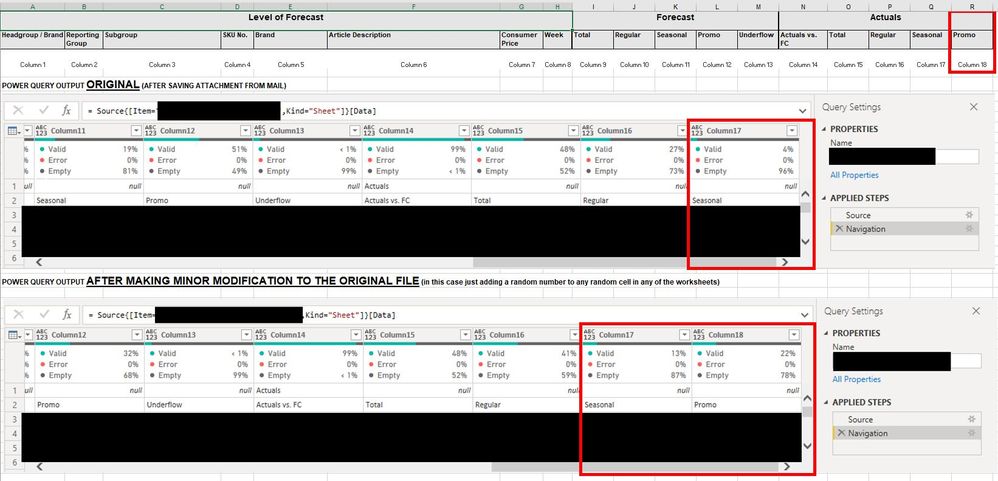

 on:
Dynamic Subscription Sent Default Page instead of ...
on:
Dynamic Subscription Sent Default Page instead of ...
 mattlee
on:
Unremovable Scroll Bars
mattlee
on:
Unremovable Scroll Bars
 on:
Gateway 3000.322.4 (June 2026): refreshes failing ...
on:
Gateway 3000.322.4 (June 2026): refreshes failing ...