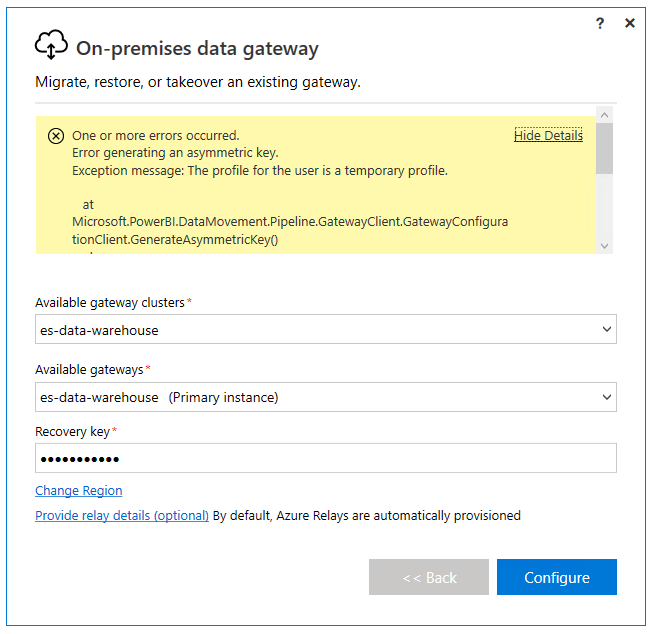
After installing the January 2024 Power BI On-Premise Gateway v 3000.202.16 and logging in successfully with my email address I get this error “The profile for this user is a temporary profile” and I cannot proceed any further due to this error. The solution is to change the user account under which the service runs BUT I've never had to do this before, so why now?
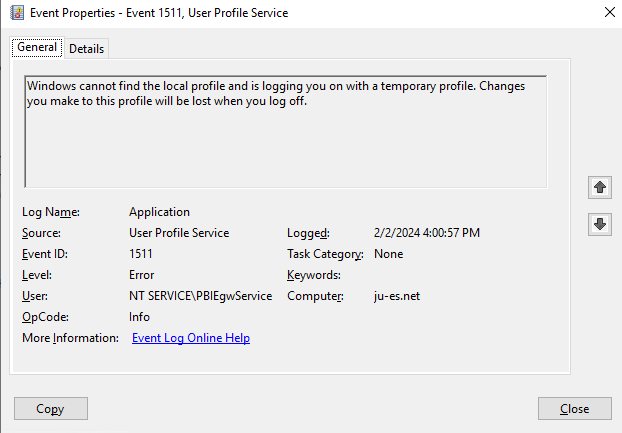
This is the gateway's service account " NT SERVICE\PBIEgwService " is being flagged as a "temporary account". I checked for this "profile" under HKEY_LOCAL_MACHINE\SOFTWARE\Microsoft\Windows NT\CurrentVersion\ProfileList\ BUT it doesn't exist.
Full text of error
One or more errors occurred.
Error generating an asymmetric key.
Exception message: The profile for the user is a temporary profile. <-- user = NT SERVICE\PBIEgwService
at Microsoft.PowerBI.DataMovement.Pipeline.GatewayClient.GatewayConfigurationClient.GenerateAsymmetricKey()
at Microsoft.PowerBI.DataMovement.GatewayCommon.DmtsGatewayCreation.CreateClusterGateway(String gatewayName, SecureString recoveryKey, String salt, SecureString legacyRecoveryKey, String legacySalt, Uri dmtsBackendUri, Guid anchorGatewayObjectId, GatewayServiceBusDetails senderDetails, GatewayServiceBusDetails listenerDetails, String registrationTenantObjectId, String registrationUserObjectId, String clientScope)
at Microsoft.PowerBI.DataMovement.EnterpriseGatewayConfigurator.WizardRestoreViewModel.<RestoreClusterGatewayAsync>d__97.MoveNext()

Any help to solve this would be greatly appreciated. Windows Server 2019.
I recommend that Microsoft releases a registry cleaner exe to wipe all files and all traces of the gateway to prepare for a perfectly clean installation. The application clearly doesn't have much budget behind it because it's frought with issues (literally all over the internet).
BTW, if you try to login to the Power BI on-premises gateway with your email address and you get the error "Network request returned unexpected error." try disabling TLS 1.3 in the registry. This worked perfectly for me, just set Enabled dword to 0, for both Client and Server folders located here HKEY_LOCAL_MACHINE\SYSTEM\CurrentControlSet\Control\SecurityProviders\SCHANNEL\Protocols\TLS 1.3

 on:
Issue with new card visual - reference labels spac...
on:
Issue with new card visual - reference labels spac...
 mattlee
on:
Issue with new card visual after publishing to PBI...
mattlee
on:
Issue with new card visual after publishing to PBI...
 on:
Issue with Card Visual Layout After November Power...
on:
Issue with Card Visual Layout After November Power...
 on:
Adding a measure or column as a tooltip to an Azur...
on:
Adding a measure or column as a tooltip to an Azur...