I like the new filter pane. We used it immideately after it was published. Everthing worked as designed. As ususal, no deviation between desktop design and the published version. Our color palette is dark due to clients CIG, so we have white font on black or dark grey background.
Some day, siddenly, the font of the filter boxes on the filter pane online became dark grey suddenly and so you can't nearly read them.
Nothing helped:
- new upload
- changing color offline, upload
- take away report level filter, upload with no filter on pane, bring it back offline upload
One thing works:
Edit the report online and change the filter pane font color.
But when I upload again, it becomes grey again.
Even when I download the pbix I edited to be correct and then upload this version: dark grey again.
See the screenshots attached
 Filter pane as designed and displayed in Power BI desktop
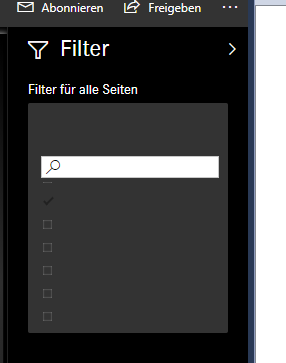 How it occurs online since several days ... (was o.k. in the beginning for several weeks)

 Hongju_Jung
on:
Translation Issue in the Korean Version
Hongju_Jung
on:
Translation Issue in the Korean Version
 on:
Issue with new card visual - reference labels spac...
on:
Issue with new card visual - reference labels spac...