Hi,
I believe this to be a bug in Power BI. Whenever I use a Multi-Row Card, and display a measure formatted with time (or time in a text format), it messes with the display in the card. Strangely though, when a second Time measure is added, the display seems to return to normal. I am currently using the Desktop version 2.52.4921.682 64-bit (November 2017).
- The top screenshot shows the card with only numeric data labels, no issue there.
- The second screenshot shows those same numbers and a measure formatted to time. For some strange reason, it places the Time data label on the top of the card even though it was placed at the bottom of the Field list, and it's displayed with a larger, bolded format, and without the Category label.
- The third screenshot has everything from the second screenshot, plus a second time measure, and for some reason, when adding the second time measure, it seems to return the display back to normal. If I were to remove the second one, it will revert back to the incorrect display again.
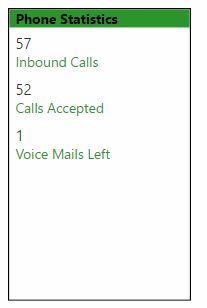 Card with no Time Measures - Looks Good
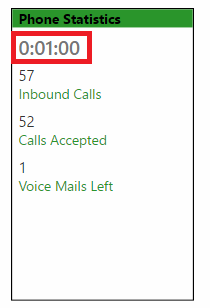 Card with numeric measures and one time measure (in red), incorrectly placed on top, in bold, and with no category label
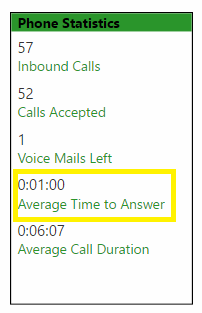 Added second Time measure, and all is back to normal again. Note the measure that is squared in yellow is the measure from the last screenshot in red.
Please let me know if there is anything I can do to fix this behavior, or if it is in fact a bug.


 on:
CMD Prompt Popping Up During Changes
on:
CMD Prompt Popping Up During Changes
 mattlee
on:
Problem : Data labels stacked bar chart
mattlee
on:
Problem : Data labels stacked bar chart