cancel
Showing results for 
Search instead for 
Did you mean: 

The Power BI Data Visualization World Championships is back! Get ahead of the game and start preparing now! Learn more

Line chart issue with 'show items with no data' when scroll bar visible

I've noticed a bug in Desktop and Service when using the 'show items with no data' functionality on an X axis, if the axis is long (so it has a scroll bar) then lines are rendered between the 2 points where data actually exists (like a continuous line on a date axis) although there should be a gap.  This only happens when there are more than one item on the chart - 2 examples below.


Example 1 - all okay, there is a break in the line as expected.
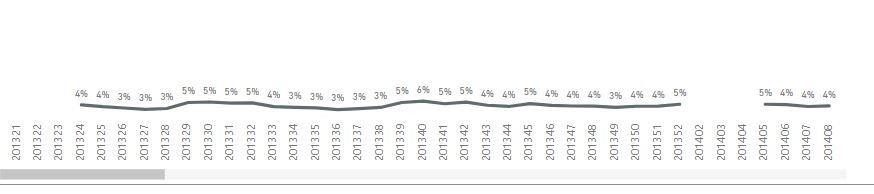
one item.JPG


Example 2 - lines are drawn where there are no data (when displaying more than one line).

two items.JPG

Both lines in example 2 should have gaps.  This only happens when the scroll bar is visible and setting the axis as below.
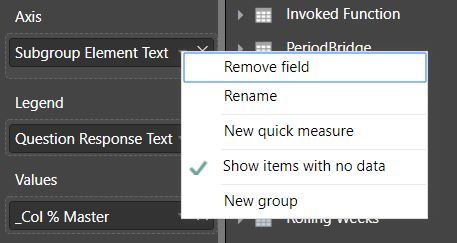
Show No Data.JPG


Example 3 - all lines should have a gap like the lower line because there are no data.
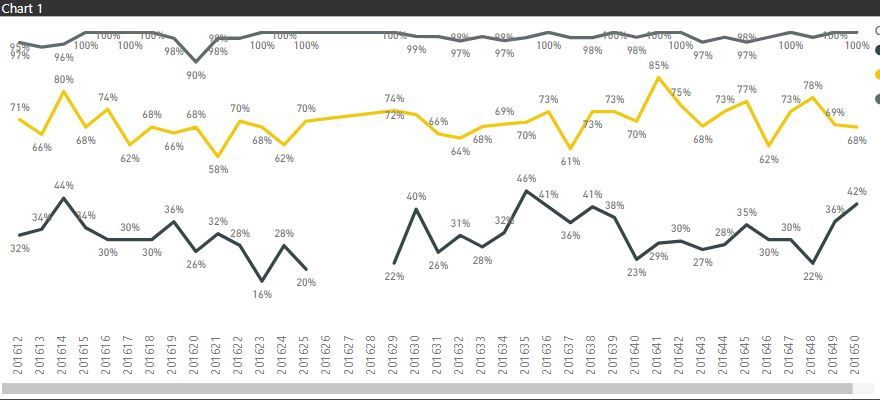
 

three items.JPG


Hopefully it can be resolved soon!

Simon

Status: Accepted
Comments
Anonymous
Not applicable

@SPMoore,

I have reported this issue interanlly : CRI 79013622. Will post back once I get any updates.


Regards,
Lydia

SPMoore
Advocate I

@Anonymous Thanks for getting back, look forward to your updates.

Thanks

Simon

Anonymous
Not applicable

@SPMoore,


I got response from PG:

"we are working on a fix, since it isn't a regression it will ride the normal deployment train and complete 8/31."

Regards,
Lydia

Anonymous
Not applicable
 
ross27
Advocate II

Any update on when we can expect this fix?

Anonymous
Not applicable

@ross27,

I have consulted internally. Will update here once I get any info.

Regards,

Lydia

Anonymous
Not applicable

@SPMoore @ross27,

I got response from PG:

"this issue is fixed, Power BI Service will be updated by Oct 26th. Fix will be included in Power BI Desktop Novermber release (mid November).

Regards,
Lydia

Anonymous
Not applicable

@SPMoore @ross27,

This issue has been fixed in November release of Power BI Desktop and Power BI Service. Please check it on your side.

Regards,
Lydia

ross27
Advocate II

Thanks @Anonymous.  That all seems to be working as expected now.