cancel
Showing results for 
Search instead for 
Did you mean: 

Get Fabric Certified for FREE during Fabric Data Days. Don't miss your chance! Request now

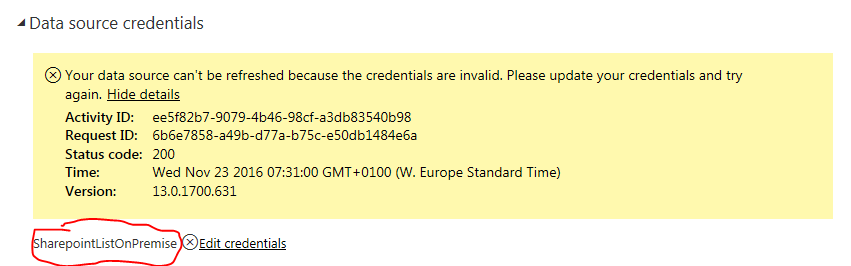
Invalid credentials on Sharepoint folder

Since yesterday I'm having an issue connecting to an excel file in a Sharepoint folder. It was already working, but I made some changes and republished it. Refresh works fine in Power BI Desktop, but online. It seem it's trying to connect to a Sharepoint list, instead of folder. I have an other report connecting to an other excel file in the same folder and it works fine. Could this be connected to the issue in North Europe? I'm in that datacenter.


Capture.PNG

Status: Accepted
Comments
Anonymous
Not applicable

Hello everyone,


It's 14th in Australia now and I still can't refresh data. Any update on the situation??

csabil
Advocate II

Yes, please give us at least an update, I'm trying to sell Power BI to management, and this makes this very hard. I created a daily report, which I have to manually update...

v-haibl-msft
Microsoft Employee

It seems that I can refresh the datasets which have the sharepoint data source now. I just tested with the new published reports and refreshed it successfully.


Best Regards,

Herbert

csabil
Advocate II

It finally works for me too.


Thanks

SergeiStPete
Helper I

Perhaps that's a bit different issue, but scheduled refresh doesn't work for me after all these changes (there were no problems a month ago or so). More exactly, it works if scheduled time is not too far from the moment i updated credentials, and fails with 'normal' refresh. It looks like oAuth token doesn't live for a long while.

No problems with manual refresh.

oAuth_SP.JPG


toulou
Frequent Visitor

I have the same issue with AzurBob now. Scheduled refreshes don't work anymore since about 12/28/2016. 


Data source type
Processing errorThe data source kind doesn't support the credential type. Data source kind: AzureBlobs. Credential type: OAuth2.
Cluster URIWABI-US-NORTH-CENTRAL-redirect.analysis.windows.net
 
I am not sure if this is somehow related to the issue above. I alreasdy have created a ticket but support so far has not been able to resolve the issue. 
 
The only work around so far is to do the refreshes manually which does not really scale. 
Anonymous
Not applicable

Is anyone else having trouble refreshing data from Sharepoint Since yesterday (16/01/2016)?


SergeiStPete
Helper I

That was as usual - manual refresh worked, scheduled one - not.

Anonymous
Not applicable

@Anonymous I'm having trouble refreshing data and changing the dataset credentials as well. On top of all that, the PowerBI Service servers seem to slow to a crawl at times. Any insight/update from the development team would be great.

mwitt
Regular Visitor

@Anonymous @Anonymous


Same problem started this afternoon. I can update, refresh, and publish from Power BI desktop but when  I try to update the credentials in Power BI online it stops responding. Power BI online is also very very slow.


We are using Power BI in a production environment and this kind of downtime without an explaination is unacceptable.