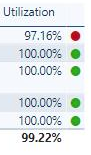
I have run into an issue while using the Icon's conditional format option while in a table. In this table, I have a Utilization Percentage column, and I wanted a health indicator icon that would display the colors I wanted within certain ranges. I set rules based on the Utilization Percentage column to where 0% -> 50% is Red, 50% -> 80% is Yellow, and 80% -> 100% is Green. This was working great until I added Filters by Slicer. When selecting one of the filter options the data would be correct (Utilization Percent), but the health indicators would suddenly change to random colors. There was no logic to this as 97% would now be Red and 95% would be Green. It almost looks as if the health indicators view the filtered Utilization Percentage as a completely different number.
Please let me know if a suspected user error is involved or if more information is needed. Thank you!
Picture is showing what happens when a filter is selected (97% is now Red when it should be Green):

 Hongju_Jung
on:
Translation Issue in the Korean Version
Hongju_Jung
on:
Translation Issue in the Korean Version
 on:
Issue with new card visual - reference labels spac...
on:
Issue with new card visual - reference labels spac...