When using conditional formatting for data labels, as introduced in July 2021, the overall number is used for the calculation, instead of the line number average.
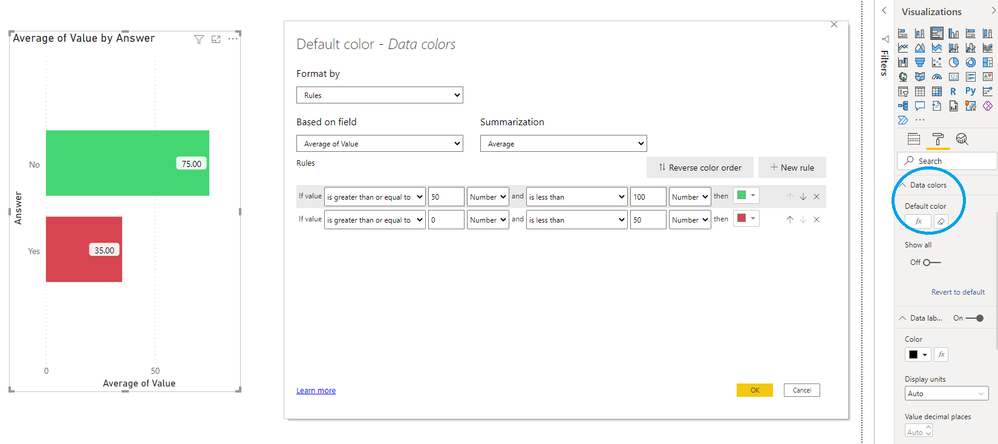
Using "data colors > default color > fx" gives the expected behavior. Bars with an average value above 50 are green, others red:
However, when choosing "data labels > color > fx", the same setup results in all data labels shown in a green font:
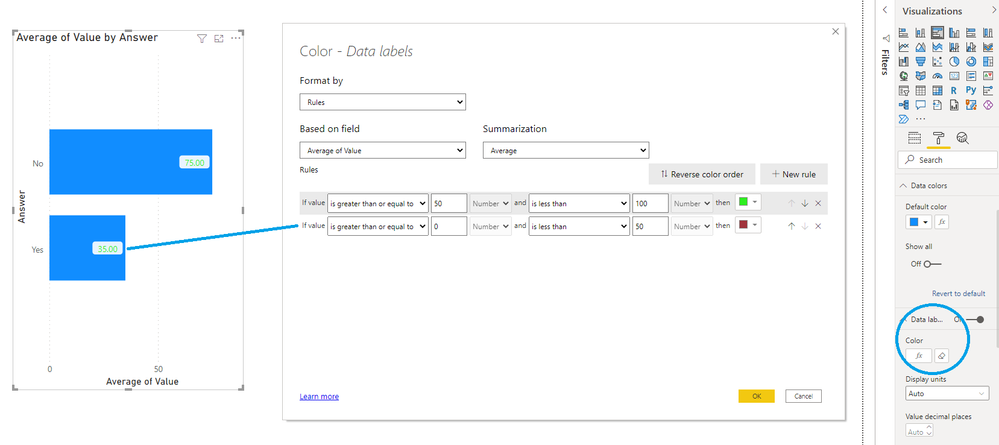
Expected behavior is that a bar with an average value below 50 shows a data label with a red font color.
Thus, using the context specific calculated value for that line/bar.


 Hongju_Jung
on:
Translation Issue in the Korean Version
Hongju_Jung
on:
Translation Issue in the Korean Version
 on:
Issue with new card visual - reference labels spac...
on:
Issue with new card visual - reference labels spac...