Having major issues with the formatting of Card (New) since the update:
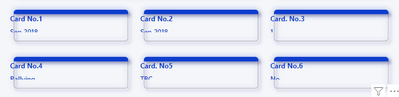
Padding options:
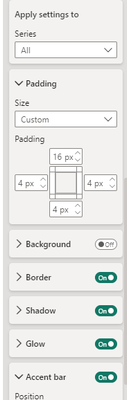
This card with two rows and 3 columns was perfect in the November update, all text was centred. Now the text is all the way to the left, the horizontal alignment ignores the padding too, and there appears to be an invisible accent bar at the bottom of each card that cuts into the text, even though my accent bar is at the top.
It's on every single one of my cards, gthe text also seems to ignore the accent bar. I have tried to create a new card and get the same problem, issue also persists if saving and opening PowerBi in my Workspace.
Can I revert back to the November update to get this to function correctly again?

 on:
Issue with new card visual - reference labels spac...
on:
Issue with new card visual - reference labels spac...
 mattlee
on:
Issue with new card visual after publishing to PBI...
mattlee
on:
Issue with new card visual after publishing to PBI...
 on:
Issue with Card Visual Layout After November Power...
on:
Issue with Card Visual Layout After November Power...
 on:
Adding a measure or column as a tooltip to an Azur...
on:
Adding a measure or column as a tooltip to an Azur...