My Analyze in Excel report worked fine until few days ago.
Now, when I'm trying to connect to old file, or generating the new .odc file, I'm receiving following error.
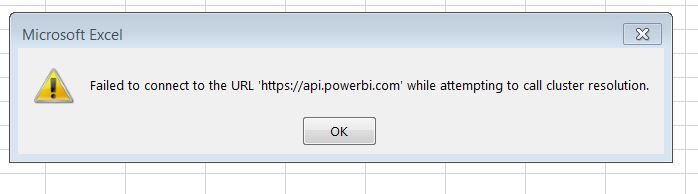
After clicking OK, file is closed, don't have even the ability to change connection data.
I'm able to connect powerbi service with the same account, have an admin privileges and can access the PowerBi Service dataset and its report. The problem consists in the MS Excel itself.
Following the steps here:
https://docs.microsoft.com/en-us/power-bi/collaborate-share/desktop-troubleshooting-analyze-in-excel
Installed new version of OLE DB drivers many times, also by uninstalling previous versions and repairing the existing ones.
Using only 1 - same account across the applications.
Any additional steps that I can make in order to get more details about this issue ?
Same issue someone ?

 mattlee
on:
“Add Value” in Textbox Not Visible in Dark Theme
mattlee
on:
“Add Value” in Textbox Not Visible in Dark Theme
 on:
Bi Crashes on launch with (AS Process PID=XXXXXX H...
on:
Bi Crashes on launch with (AS Process PID=XXXXXX H...
 on:
Fix the Date function in DAX
on:
Fix the Date function in DAX
 on:
May 25 update for Snowflake Connector v2 has broke...
on:
May 25 update for Snowflake Connector v2 has broke...
 on:
Unable to open existing PBIP files
on:
Unable to open existing PBIP files