We are connecting to Snowflake using built-in Snowflake connector with PowerBI Desktop 2019, version March 2022.
When we add Snwoflake as a new source using the built-in connector, connection is established successfuly. If databases with case sensitive names exist, PowerBI is not able to access these databases. It returns "ODBC: Error 42000 SQL compilation error...".
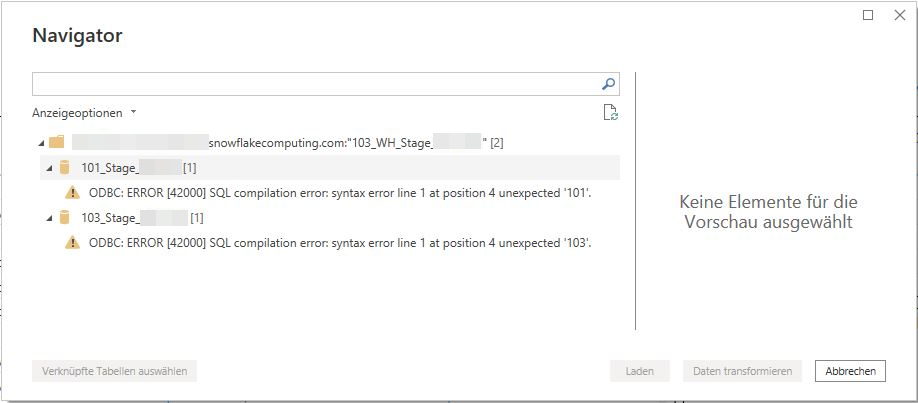 SQL compilation error for case-sensitive databases
The same issue appears in existing reports.

However, the code generated by PowerBI is valid.
let
    Source = Snowflake.Databases("mysnowflakeaccount.snowflakecomputing.com","""103_WH_Stage_MY_WH"""),
    #"103_Stage_MY_DB_Database" = Source{[Name="103_Stage_MY_DB",Kind="Database"]}[Data],
    MY_SCHEMA_Schema = #"103_Stage_MY_DB_Database"{[Name="MY_SCHEMA",Kind="Schema"]}[Data],
    MY_TABLE_Table = MY_SCHEMA_Schema{[Name="MY_TABLE",Kind="Table"]}[Data]
in
    MY_TABLE_Table
This issue first occures with PowerBI March 2022 (version 2.103.661.0). Older versions do not seem to have this problem (February 2022 and December 2021 were tested).
Workarounds successfully tested:
- Use non-case-sesitive names for databases
- Use the official ODBC driver provided by Snowflake instead of the internal Snowflake connector
We could not find a final solution for the internal Snowflake connector. Are there any ideas, please?

 mattlee
on:
Unremovable Scroll Bars
mattlee
on:
Unremovable Scroll Bars
 on:
Gateway 3000.322.4 (June 2026): refreshes failing ...
on:
Gateway 3000.322.4 (June 2026): refreshes failing ...