cancel
Showing results for 
Search instead for 
Did you mean: 

The Power BI Data Visualization World Championships is back! Get ahead of the game and start preparing now! Learn more

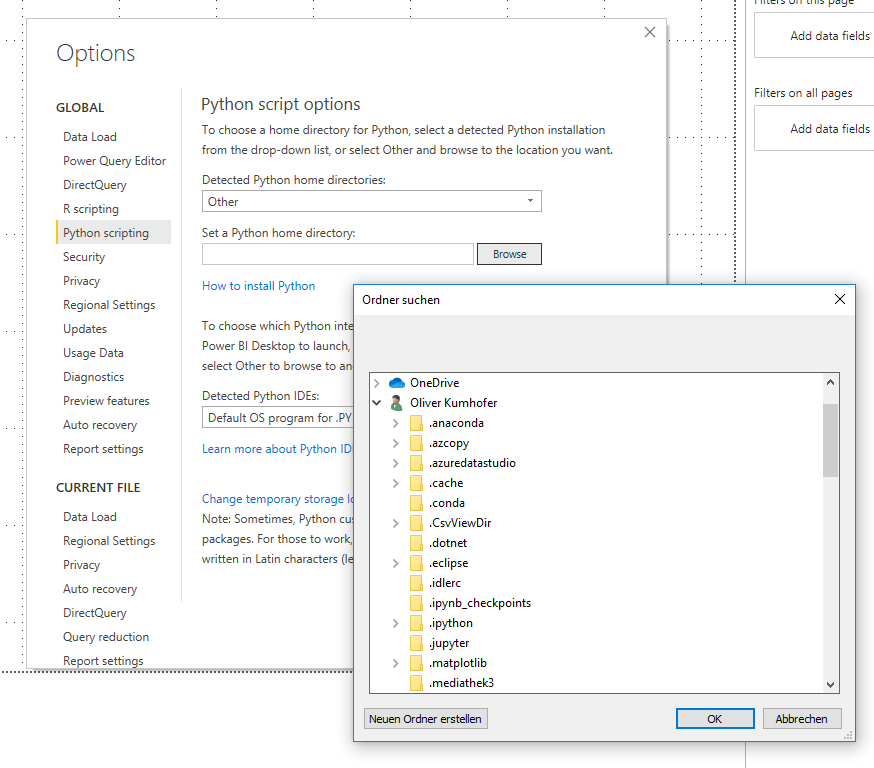
Python Home path can not be edited

If the python home directory is not listed in the drop down you have to manually assign it in the PowerBI options.
But the input field is not editable only folder choose by GUI where many paths are missing, e.g.:
C:\Users\xxxxx\AppData\Local\Continuum\anaconda3

So how to add this path!?

PythonPath.png


Status: New
Comments
v-qiuyu-msft
Community Support

Hi @Anonymous, 


The AppData is a hidden folder. Please open File Explorer, check Hidden Items in View tab. 


The go to Power BI desktop, set the Python home directory, AppData folder is available. 


q1.PNG


Best Regards,
Qiuyun Yu

Anonymous
Not applicable

I also have this problem.  I cannot find a way to enter C:\Python310\


kyleegbert_0-1665702709245.png


hectordc90
New Member

I have a simmilar problem,

Im using anaconda and I created a new environment, but I cannot find the folder to assign. When I click the browser button it only gives me the option to choose from the desktop folder, but my enviroment is hold in the C:\Users\hdav\anaconda3\envs\pbi, please could someone help me? I would very appreciate.Sin título.jpg

anilsuri
Frequent Visitor

Same issue - have different environments on Anaconda and want to point a specific environment to Power BI all I get is the Desktop folder and the subfolders within it. Selected Other but does not let me enter the path


Thanks