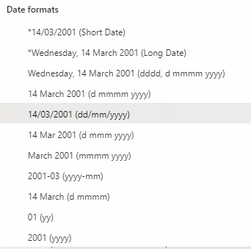
I'm quite sure this is a bug as it began happening after the recent updates the desktop app. All my dates are formatted as the local style (DD/MM/YYYY) and under the column tools I specifically select the same format, see below.
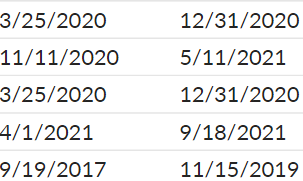
However, all my dates in the visualisations are in M/DD/YYYY format, see below. Despite my selection above.
When I change the format to something else (like D/MMM/YYYY) and change back to what I want, the issue is resolved.
I believe it might be because I have a US keyboard and my Windows is set to US region, but I have different date/time formats that we use locally.

 DataZoe
on:
Subject: Regression – Synchronized axis ranges no ...
DataZoe
on:
Subject: Regression – Synchronized axis ranges no ...
 on:
Text Input Slicer is not reset by bookmarks in Pow...
on:
Text Input Slicer is not reset by bookmarks in Pow...
Deliver test result and possible solution.