cancel
Showing results for 
Search instead for 
Did you mean: 

The Power BI Data Visualization World Championships is back! Get ahead of the game and start preparing now! Learn more

Excel Data - Issue converting numeric to text

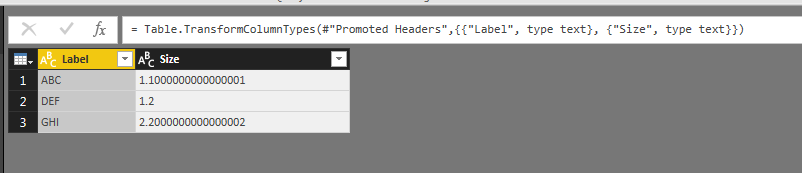
I am trying to import a mixed (number and text) column from Excel into PowerBI, due to the start of the column all being numbers PowerBI has chosen the column type as numeric.  However when I change type to text the values 1.1 and 2.2 are being incorrectly converted to 1.1000000000000001 and 2.2000000000000002 respectively.


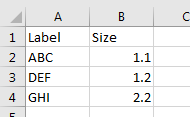
I have tested with a small sample set of data and am able to easily replicate see below:


ExclConv.PNG

PowerBI Convert Test.PNG

Status: Accepted
Comments
v-haibl-msft
Microsoft Employee

@DSTUART


I can repro the same issue as you. I’ve reported it internally to Power BI Team: CRI 45625491
I’ll post here once I get any update about it.


Best Regards,
Herbert

Vicky_Song
Impactful Individual
Status changed to: Accepted
 
v-haibl-msft
Microsoft Employee

@DSTUART


I've got response from the Product Team.


Instead of changing the type again, the customer should delete the previous type conversion to number by editing the automatically-generated formula that changes the type the first time.

When you enter a "1.1" into a cell, Excel actually stores it as follows: <row r="2" x14ac:dyDescent="0.25" spans="1:1"><c r="A2"><v>1.1000000000000001</v></c></row>

So you can see that we're accurately showing the value stored by Excel even though it differs from the value displayed by Excel.


As a workaround, you can split column as following screenshot.


Excel Data - Issue converting numeric to text_1.jpg 


Best Regards,
Herbert

DSTUART
Regular Visitor

Thanks for the feedback, but this is a workaround that can be achieved outside of PowerBI. But it would be better with bug solution.

amirshiloh
Advocate II

bug still exists,

first partial solution would be to add a step at the Power Query data model as follows:

it won't solve an issue as convert 1.1 and 1.10 - these two values will transfered to value of 1.1 😐

= Table.TransformColumns(#"<MyLast step name>", {{"MyValue", each try Text.From(Number.Round(Number.From(_),2)) otherwise Text.From(_), type text}})

second partial solution (need to edit the Excel at the source) - add ' at the orignal excel before the value and it will fix it when importing the data to power bi -when transfer the value type to text it will dispalyed correctly

rossid
Frequent Visitor

I'm having this issue. Quite why it would be acceptable to change the number to something different is bizarre. Its recorded as 1.1 in Excel. This is doing it for only certain numbers in the single decimal place number range. I have even set the cells in Excel to Text type and it still reads it (and incorrectly displays it) as a 15-dp number.