Join us at FabCon Vienna from September 15-18, 2025
The ultimate Fabric, Power BI, SQL, and AI community-led learning event. Save €200 with code FABCOMM.
Get registered- Power BI forums
- Get Help with Power BI
- Desktop
- Service
- Report Server
- Power Query
- Mobile Apps
- Developer
- DAX Commands and Tips
- Custom Visuals Development Discussion
- Health and Life Sciences
- Power BI Spanish forums
- Translated Spanish Desktop
- Training and Consulting
- Instructor Led Training
- Dashboard in a Day for Women, by Women
- Galleries
- Data Stories Gallery
- Themes Gallery
- Contests Gallery
- Quick Measures Gallery
- Notebook Gallery
- Translytical Task Flow Gallery
- TMDL Gallery
- R Script Showcase
- Webinars and Video Gallery
- Ideas
- Custom Visuals Ideas (read-only)
- Issues
- Issues
- Events
- Upcoming Events
Enhance your career with this limited time 50% discount on Fabric and Power BI exams. Ends September 15. Request your voucher.
- Power BI forums
- Issues
- Issues
- Editing to Desktop from OnPremise gives Syntax err...
- Subscribe to RSS Feed
- Mark as New
- Mark as Read
- Bookmark
- Subscribe
- Printer Friendly Page
- Report Inappropriate Content

Editing to Desktop from OnPremise gives Syntax error
I have a SSRS installation using Power BI Server version 14.0.600.286 (June 2017). When I use Internet Explorer (v.11) to visualise a Power BI on premise, all is good. However, when I select Edit in Power BI Desktop, I get the splashscreen telling me it is starting the desktop application. Then, I get a message box stating Syntax: PBIDesktop.exe [filename.pbix], and nothing happens (the process simply stops). It is the same situation if I select Edit in Power BI Desktop from the ellipsis button of a report on the portal.
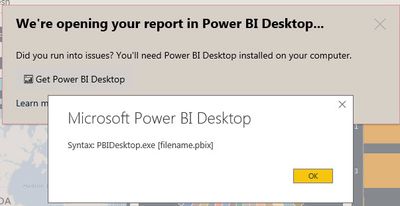
When using Chrome, Power BI Desktop opens without an issue. Power BI Desktop is version 2.47.4766.1221 32 bits (June 2017).
You must be a registered user to add a comment. If you've already registered, sign in. Otherwise, register and sign in.
- DataMindedLLC on: 'Refresh Preview' gone from Home Menu Bar in Aug 2...
- Sree9100822653 on: undefinedHow to send daily RLS-based Power BI repo...
- annelebel on: August 2025 Update Changed DirectQuery so each tab...
- manu_panizi on: Direct Query Mode Missing
- Jstukenborg on: Data on Power BI desktop is not refreshing
- noahfox on: Fabric 'Deploy Stage Content' API fails when user ...
- erpfau on: Fields Parameter w. hierarchies: provide option to...
- Rabea_Damlakhy on: Critical Bug: Deleting a Visual Group on One Page ...
- discolisa on: Remove / Copy Visual issue - July 2025 Desktop Iss...
- stipa on: Error "[403.12–403.30] The name 'Lakehouse.Content...
- New 8,100
- Needs Info 3,502
- Investigating 3,602
- Accepted 2,088
- Declined 38
- Delivered 3,970
-
Reports
10,270 -
Data Modeling
4,154 -
Dashboards
4,123 -
Report Server
2,120 -
Gateways
2,119 -
APIS and Embedding
1,971 -
Custom Visuals
1,794 -
Content Packs
527 -
Mobile
354 -
Need Help
11 -
Show and Tell
3 -
General Comment
2 -
Tips and Tricks
1 -
Power BI Desktop
1