I have created a column that previously was defined as TExt. But I wanted to switch it to Number once I had resolved the data type conflicts.
The problem is that the column header says its number format but the contents is displayed as Text and the next steps is trying to filter numbers and it fails complaining that it can't apply '>' operator to type number and text operands.
Here's the instruction that is producing the new column:
Table.AddColumn(#"Trimmed text", "CldStartYear", each Text.Start([DLL1TX], 4), Int64.Type)
And here's the result which in this case, the column on the left is not showing up content as numeric even though the header says it is :
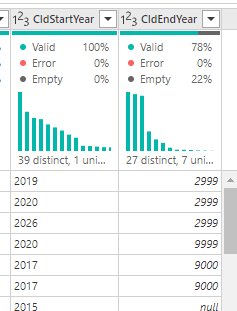
And when I try this:
Table.SelectRows(addcol_CldEndYear, each [CldStartYear] >= 2021)
I got this error:


 mattlee
on:
Unremovable Scroll Bars
mattlee
on:
Unremovable Scroll Bars
 on:
Gateway 3000.322.4 (June 2026): refreshes failing ...
on:
Gateway 3000.322.4 (June 2026): refreshes failing ...