cancel
Showing results for 
Search instead for 
Did you mean: 

The Power BI Data Visualization World Championships is back! Get ahead of the game and start preparing now! Learn more

Data missing from Power Query at certain steps

I have 3 tables in this scenario all imported, two raw tables, Plan table (50k rows) & Individual Meetings (5k rows) table and the 3rd table known as "Attended Before Plan". The third table is the same source as the Plan table but merges queries with the Individual Meeting table in Power Query (joining via a user_id column). I then do a Conditional Column before Grouping the data by the Plan_ID (known as ID in the screenshot) in order to work out the number of meetings attended before a plan is created for each plan.


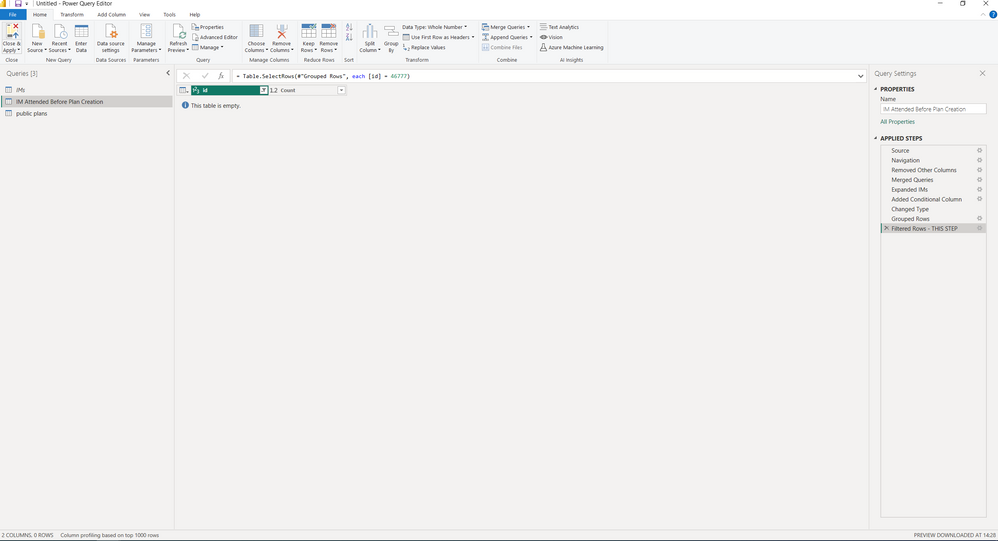
I noticed some data was missing so I've been trying to diagnose the problem in my code but when I found a user who's Plan_ID (ID in screenshot) is 46777 they do have data when I filter them throughout the query. However if I move the filter to be after the grouping by ID, they disappear and can't be found. For some reason this means that if I don't have the filter they don't appear in my final set of data (note; this isn't just one user who is effected)


Not sure how to resolve this, could it be to do with data size? There's not a massive amount of data which is very confusing

Any help appreciated
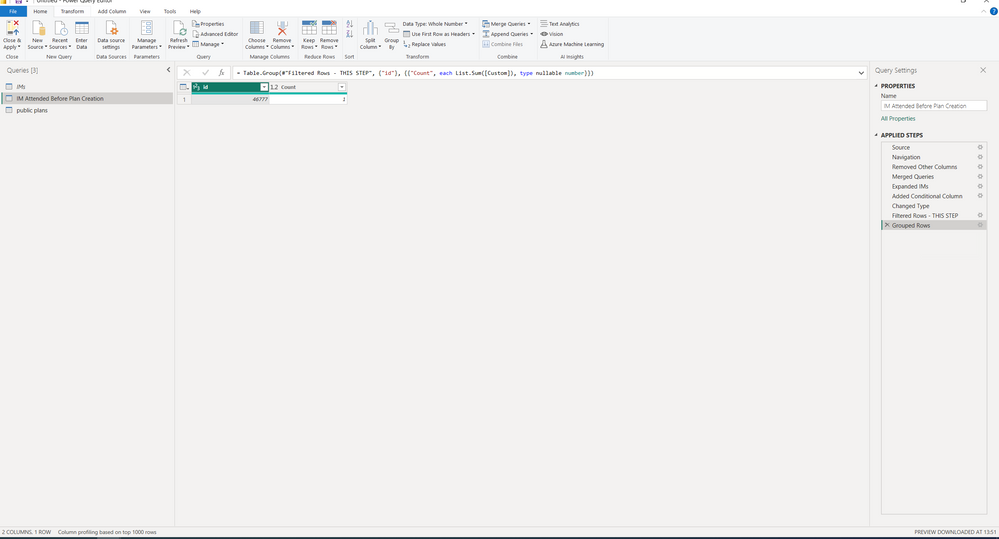
Filter before the GroupingFilter before the GroupingFilter after the groupingFilter after the grouping

Status: Investigating
Comments
Anonymous
Not applicable

Hi @RMurtagh ,


I did a simple test according to the information you provided, but it doesn't seem to reproduce your problem
My test Version: 2.114.803.0 64-bit (February 2023)

vcaitlynmstf_0-1677206091176.png


Best regards.
Community Support Team_ Caitlyn


RMurtagh
Frequent Visitor

Hi @Anonymous ,


it only seems to be on the volume of data I'm using that I'm getting this issue. When using a small subset of data it works fine. It's not a huge amount of data (50k rows and a 5k row merging onto it) but it won't replicate at smaller data levels

decarsul
Helper V

Is this still under investigation?

I appear to have the same issue, i'm using an azure devops odata feed.

So this should be replicable by MS.


I've added a blank line.

If you apply a filter here to an workitemid that is missing at the end. it will re-appear


code, anonymized: let Bron = OData.Feed("https://analytics.dev.azure.com/X-X/x-x-x-x-x-x-x-x/_odata/v4.0-preview/", null, [Implementation="2.0"]), WorkItemBoardSnapshot_table = Bron{[Name="WorkItemBoardSnapshot",Signature="table"]}[Data], #"Rijen gefilterd" = Table.SelectRows(WorkItemBoardSnapshot_table, each ([ColumnName] = x-x-x-x-x-x)), #"Converted to Date" = Table.TransformColumns(#"Rijen gefilterd", {{"DateValue", each Date.From(_), type date}}), #"Sorteren op datevalue om laatste record als eerste te hebben" = Table.Sort(#"Converted to Date",{{"DateValue", Order.Descending}}), #"Andere kolommen verwijderd" = Table.SelectColumns(#"Sorteren op datevalue om laatste record als eerste te hebben",{"WorkItemId", "DateValue", "ColumnName"}), #"BufferedTable" = Table.Buffer(#"Andere kolommen verwijderd"), #"Dubbele waarden verwijderd" = Table.Distinct(BufferedTable, {"WorkItemId"}) in #"Dubbele waarden verwijderd"

decarsul
Helper V

Maybe it helps to add the way i found this. I made an additional facts table, to contain every tag per workitemid.

After creating a relationship and a visual to combine tags with the board columns and workitem id's, i found blank rows where a match couldn't be found.