
Don't miss your chance to take the Fabric Data Engineer (DP-600) exam for FREE! Find out how by attending the DP-600 session on April 23rd (pacific time), live or on-demand.
Learn moreNext up in the FabCon + SQLCon recap series: The roadmap for Microsoft SQL and Maximizing Developer experiences in Fabric. All sessions are available on-demand after the live show. Register now
Hello at all,
I would like to track a team KPI and I can't figure out how. I would like to have a graph of the open project team in values.
I would like each team member to be able to check off the projects they are involved in.
I would like the selection of the checked lines to be saved and thus have the share of project followed.
Example :
PROJECT 1 - 500K$ - YES
PROJECT 2 - 200K$ - YES
PROJECT 3 - 700K$ - NO
RESULT
CHART WITH VALUE : 700K$ / TOTAL PROJECT 1400K$ = 50% COVER PROJECT
Sorry if it's not clear and thanks for your help and consideration
thks lot
Hi @Abdennor , Thanks for your query.
The requirements are not very clear. I have tried to implement as per my understanding. Please let me know if this is something you are looking for.
Here is my solution:
Steps:
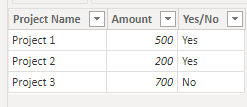
1. I have used the data you have shared in your post:
2. Create the below three measures:
Total Project Value = SUM('DataTable'[Amount])
Total Cover Project = CALCULATE(SUM( 'DataTable'[Amount] ), 'DataTable'[Yes/No] = "Yes")
Total Cover Project % = DIVIDE( [Total Cover Project], [Total Project Value] )
3. Use a Multi-Row Card and pull the above three measures and you get the result as below:
|
** If you liked my solution, please give it a thumbs up. And if I did answer your question, please mark this post as a solution, so that it comes in top of the search and help others. Thank you ! Good Luck 👍 |
Thanks lot for your help. I was just starting out and now I'm using the measurement functions.
@Abdennor Thanks!
|
** If you liked my solution, please give it a thumbs up. And if I did answer your question, please mark this post as a solution, so that it comes in top of the search and help others. Thank you ! Good Luck 👍 |
I'm sorry I wasn't very specific. Thanks anyway
I use a table of data on current projects.
I want project managers to be able to intuitively tell which project they are involved in. So I can have a clear view on the project management per employee.
regards
@Abdennor Thanks for your reply !
Does my above solution meets your requirement? If yes, then please accept it as solution, else, please share your pbix file. I will take a look at it. Thanks !
If you have recently started exploring Fabric, we'd love to hear how it's going. Your feedback can help with product improvements.
A new Power BI DataViz World Championship is coming this June! Don't miss out on submitting your entry.
| User | Count |
|---|---|
| 44 | |
| 43 | |
| 38 | |
| 19 | |
| 15 |
| User | Count |
|---|---|
| 68 | |
| 64 | |
| 31 | |
| 29 | |
| 24 |