
Join us at FabCon Atlanta from March 16 - 20, 2026, for the ultimate Fabric, Power BI, AI and SQL community-led event. Save $200 with code FABCOMM.
Register now!The Power BI Data Visualization World Championships is back! Get ahead of the game and start preparing now! Learn more
Hello at all,
I would like to track a team KPI and I can't figure out how. I would like to have a graph of the open project team in values.
I would like each team member to be able to check off the projects they are involved in.
I would like the selection of the checked lines to be saved and thus have the share of project followed.
Example :
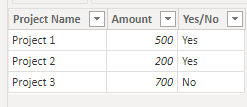
PROJECT 1 - 500K$ - YES
PROJECT 2 - 200K$ - YES
PROJECT 3 - 700K$ - NO
RESULT
CHART WITH VALUE : 700K$ / TOTAL PROJECT 1400K$ = 50% COVER PROJECT
Sorry if it's not clear and thanks for your help and consideration
thks lot
Hi @Abdennor , Thanks for your query.
The requirements are not very clear. I have tried to implement as per my understanding. Please let me know if this is something you are looking for.
Here is my solution:
Steps:
1. I have used the data you have shared in your post:
2. Create the below three measures:
Total Project Value = SUM('DataTable'[Amount])
Total Cover Project = CALCULATE(SUM( 'DataTable'[Amount] ), 'DataTable'[Yes/No] = "Yes")
Total Cover Project % = DIVIDE( [Total Cover Project], [Total Project Value] )
3. Use a Multi-Row Card and pull the above three measures and you get the result as below:
|
** If you liked my solution, please give it a thumbs up. And if I did answer your question, please mark this post as a solution, so that it comes in top of the search and help others. Thank you ! Good Luck 👍 |
Thanks lot for your help. I was just starting out and now I'm using the measurement functions.
@Abdennor Thanks!
|
** If you liked my solution, please give it a thumbs up. And if I did answer your question, please mark this post as a solution, so that it comes in top of the search and help others. Thank you ! Good Luck 👍 |
I'm sorry I wasn't very specific. Thanks anyway
I use a table of data on current projects.
I want project managers to be able to intuitively tell which project they are involved in. So I can have a clear view on the project management per employee.
regards
@Abdennor Thanks for your reply !
Does my above solution meets your requirement? If yes, then please accept it as solution, else, please share your pbix file. I will take a look at it. Thanks !
The Power BI Data Visualization World Championships is back! Get ahead of the game and start preparing now!
Check out the November 2025 Power BI update to learn about new features.
| User | Count |
|---|---|
| 59 | |
| 43 | |
| 42 | |
| 23 | |
| 17 |
| User | Count |
|---|---|
| 190 | |
| 122 | |
| 96 | |
| 66 | |
| 46 |