
Get certified for free when you join Fabric Data Days 2026 and dive into Fabric, Power BI, SQL, AI, and other essential data skills.
Join nowTry your skills in the Power BI Dataviz World Championship! Round one ends June 26. Join now
Hi Team,
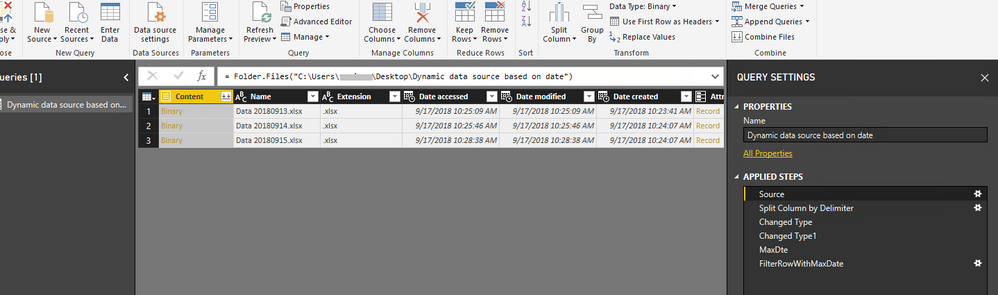
I have requirement like, from a folder of Excel files i have to pick the data file of MAX datekey files will be maintained in particular fashion i.e, Data Datekey
As mentioned in the image file with max date key to be picked.
I believe it is possible by passing parameter to MQuery.
Thanks in advance..
Solved! Go to Solution.
Hi @vedansh,
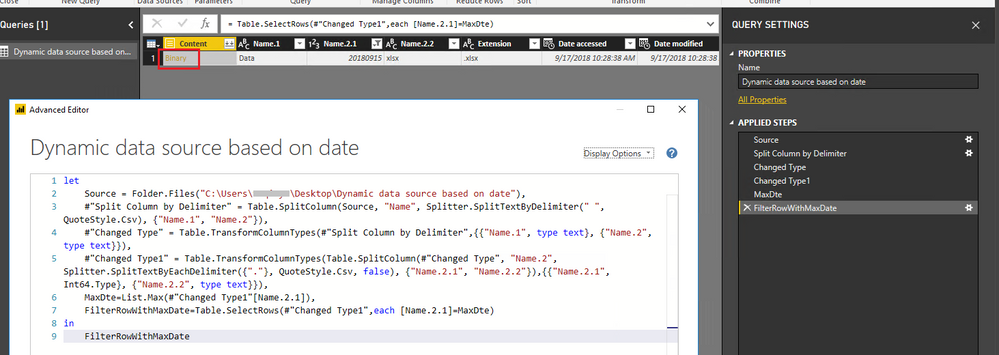
You can use query below to find the Excel file with the maximum date in Power BI desktop:
let
Source = Folder.Files("<folder path>"),
#"Split Column by Delimiter" = Table.SplitColumn(Source, "Name", Splitter.SplitTextByDelimiter(" ", QuoteStyle.Csv), {"Name.1", "Name.2"}),
#"Changed Type" = Table.TransformColumnTypes(#"Split Column by Delimiter",{{"Name.1", type text}, {"Name.2", type text}}),
#"Changed Type1" = Table.TransformColumnTypes(Table.SplitColumn(#"Changed Type", "Name.2", Splitter.SplitTextByEachDelimiter({"."}, QuoteStyle.Csv, false), {"Name.2.1", "Name.2.2"}),{{"Name.2.1", Int64.Type}, {"Name.2.2", type text}}),
MaxDte=List.Max(#"Changed Type1"[Name.2.1]),
FilterRowWithMaxDate=Table.SelectRows(#"Changed Type1",each [Name.2.1]=MaxDte)
in
FilterRowWithMaxDate
Then you can click Binary to extract data from the Excel file.
Best Regards,
Qiuyun Yu
Hi @vedansh,
You can use query below to find the Excel file with the maximum date in Power BI desktop:
let
Source = Folder.Files("<folder path>"),
#"Split Column by Delimiter" = Table.SplitColumn(Source, "Name", Splitter.SplitTextByDelimiter(" ", QuoteStyle.Csv), {"Name.1", "Name.2"}),
#"Changed Type" = Table.TransformColumnTypes(#"Split Column by Delimiter",{{"Name.1", type text}, {"Name.2", type text}}),
#"Changed Type1" = Table.TransformColumnTypes(Table.SplitColumn(#"Changed Type", "Name.2", Splitter.SplitTextByEachDelimiter({"."}, QuoteStyle.Csv, false), {"Name.2.1", "Name.2.2"}),{{"Name.2.1", Int64.Type}, {"Name.2.2", type text}}),
MaxDte=List.Max(#"Changed Type1"[Name.2.1]),
FilterRowWithMaxDate=Table.SelectRows(#"Changed Type1",each [Name.2.1]=MaxDte)
in
FilterRowWithMaxDate
Then you can click Binary to extract data from the Excel file.
Best Regards,
Qiuyun Yu
| User | Count |
|---|---|
| 24 | |
| 22 | |
| 22 | |
| 21 | |
| 13 |
| User | Count |
|---|---|
| 66 | |
| 56 | |
| 45 | |
| 45 | |
| 30 |