Don't miss your chance to take the Fabric Data Engineer (DP-700) exam on us!
Learn moreNext up in the FabCon + SQLCon recap series: The roadmap for Microsoft SQL and Maximizing Developer experiences in Fabric. All sessions are available on-demand after the live show. Register now
Hi,
I have a problem exporting data in xlsx format from dashboards. The "underlying data" option is disabled (I can't choose the option). The permissions to download underlying and summary data are enabled. Also, the dashboard was checked from the dashboard owner account.
Can this be in addition to the report settings?
Greetings and thank you!
Solved! Go to Solution.
Hi @lfvalencia ,
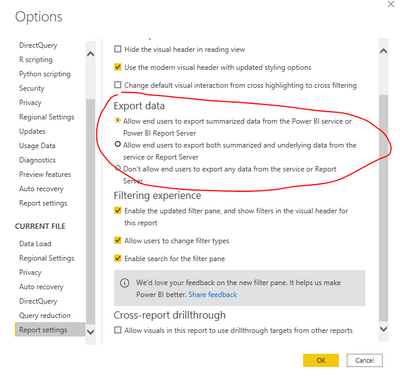
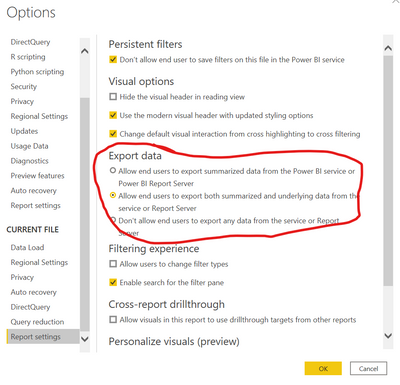
About the underlying data, you should configure it in Desktop before publish the report to Service.
Best Regards,
Jay
Community Support Team _ Jay Wang
If this post helps, then please consider Accept it as the solution to help the other members find it more quickly.
Hi @lfvalencia ,
Configure this in the desktop report settings.
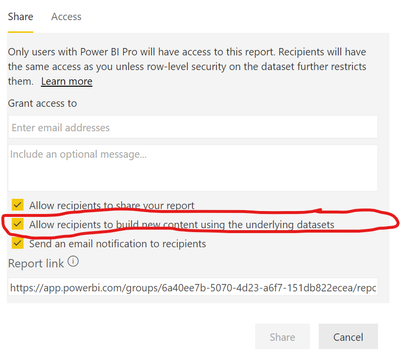
And while sharing the report, check the box to allow users to access uderlying datasets.
Hi @lfvalencia ,
About the underlying data, you should configure it in Desktop before publish the report to Service.
Best Regards,
Jay
Community Support Team _ Jay Wang
If this post helps, then please consider Accept it as the solution to help the other members find it more quickly.
If you have recently started exploring Fabric, we'd love to hear how it's going. Your feedback can help with product improvements.
A new Power BI DataViz World Championship is coming this June! Don't miss out on submitting your entry.
Share feedback directly with Fabric product managers, participate in targeted research studies and influence the Fabric roadmap.