Get certified for free when you join Fabric Data Days 2026 and dive into Fabric, Power BI, SQL, AI, and other essential data skills.
Join nowJuly 28 - August 9 | Final Round of the Power BI Dataviz World Championships. This is your chance. Learn more
Hi,
I have a problem exporting data in xlsx format from dashboards. The "underlying data" option is disabled (I can't choose the option). The permissions to download underlying and summary data are enabled. Also, the dashboard was checked from the dashboard owner account.
Can this be in addition to the report settings?
Greetings and thank you!
Solved! Go to Solution.
Hi @lfvalencia ,
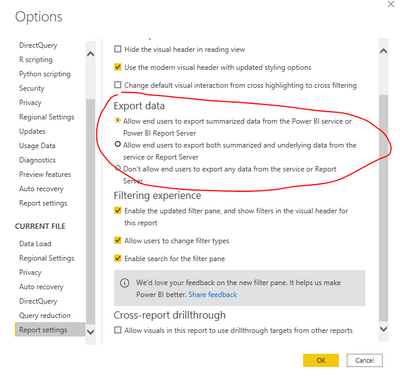
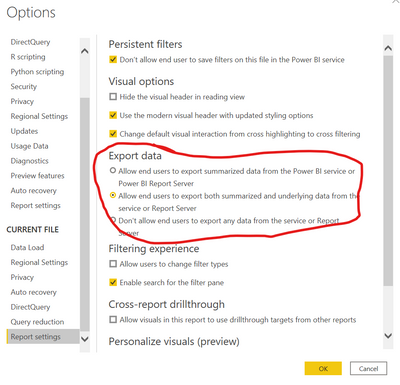
About the underlying data, you should configure it in Desktop before publish the report to Service.
Best Regards,
Jay
Community Support Team _ Jay Wang
If this post helps, then please consider Accept it as the solution to help the other members find it more quickly.
Hi @lfvalencia ,
Configure this in the desktop report settings.
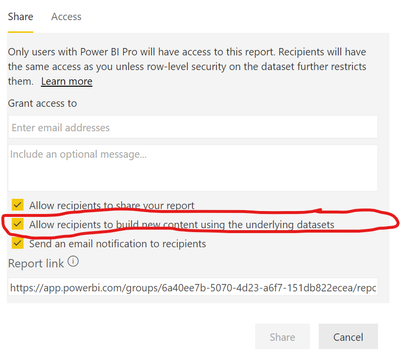
And while sharing the report, check the box to allow users to access uderlying datasets.
Hi @lfvalencia ,
About the underlying data, you should configure it in Desktop before publish the report to Service.
Best Regards,
Jay
Community Support Team _ Jay Wang
If this post helps, then please consider Accept it as the solution to help the other members find it more quickly.
If you love stickers, then you will definitely want to check out our community sticker challenge, Barcelona edition!
Check out the July 2026 Power BI update to learn about new features.
| User | Count |
|---|---|
| 10 | |
| 9 | |
| 9 | |
| 7 | |
| 5 |